Credit risk data reports
Credit risk data reports intro
As a Cross River credit BIN sponsorship partner, we need you to send us a monthly summary of specific credit risk metrics that are not visible to us. To make things easy, we’ve got a common data exchange format (.csv - comma-separated values) for you to use. This page will walk you through the metrics you need to share with us, the data exchange format, and how to send the file our way.
Before you begin
- Ensure you’ve submitted the complete IP Access Request for CRB SFTP Services form. Get this form from your Cross River Implementation or Relationship Manager. When Cross River gets your completed form, we begin the process of setting up your SFTP access. Learn more about SFTP setup.
- Once you are set up for SFTP, ensure you have a /ClientCredit subfolder in your Cross River SFTP folder. This is where you’ll put your csv file. Cross River provides you with the full path when you get your access credentials. Contact your Relationship Manager with any questions.
File structure
The credit risk metrics file must be formatted in a specific way. To prepare the credit risk metrics file:
- Use this file naming convention: CreditRiskMetrics_PartnerAbbreviation_datetimestamp.csv Use a 3- to 6-character string for the PartnerAbbreviation that clearly refers your organization, and that Cross River will understand.
- File names should be unique. Use the date time stamp from when the file is created. This does not need to match the date of the records within the file.
- Format the datetimestamp as yyyymmddhhmm. If the date and time stamp is automated, the format can include seconds.
- For file renaming, update the datetimestamp or append 'Update' or ' V2' after the datetimestamp to avoid duplicate names of previous files sent.
- Use this file format/delimiter: .csv (comma-separated values)
- File header: Use these and only these column names in your file: COSPartnerID, MetricMonth, MetricAbbrev, MetricValue, SubPartnerID
- File footer: Do not include a footer.
- Build the file:
- Each row/record in the .CSV represents a single monthly credit risk metric value. Each record you send must include entries each of these 4 columns: COSPartnerID, MetricMonth, MetricAbbrev, MetricValue, and SubPartnerID. The table below explains the expected column records in further detail.
- Note: The only optional field is SubPartnerIDas this might not apply to your program.
- No specific order is required for the metric records submitted.
- If, on a row, the MetricMonth, MetricAbbrev, MetricValue, and SubPartnerIDis not unique within the file, the first MetricValuelisted in the file will persist as the metric of record.
Required metrics
The required metrics for Cross River BIN sponsor card programs may vary depending on your specific program. Include only the applicable metrics in your file submission and omit any that are not required. If you have questions about which metrics apply, please contact your relationship manager.
Sequence/ Position | Column | Description | Format |
|---|---|---|---|
1 | COSPartnerID | Your Cross River partner ID supplied to you by us. This ID acts as a unique identifier for your program | GUID (36 characters) |
2 | MetricMonth | The month the credit risk metric record is for. This value must be entered as the last day of the month the report covers. Failing to use the last day of the month might require a resubmission. | YYYY-MM-DD (last day of the month) |
4 | MetricValue | The actual credit risk metric supplied as a number (either a count of a metric or a dollar ($) amount) | Must be a number |
5 | SubPartnerID(optional) | Identifier for partners who aggregate mulitple programs under them. Program-specific. | String |
Metric abbreviation catalog
Metric | Abbreviation | Description | Metric Type ($ amount or Count) | Calculation Method |
|---|---|---|---|---|
Total apps received | TAR | Number of completed applications (number of Pending, Declined, and approved together should equal the number of Total Apps received) | Count | Monthly total |
Total apps pending | TAP | Number of completed applications that are pending | Count | Monthly total |
Total apps incomplete | TAI | Number of incomplete applications | Count | Monthly total |
Total apps declined | TAD | Number of declined applications | Count | Monthly total |
Total approvals | TAA | Number of approved applications | Count | Monthly total |
Total subprime approvals (if applicable to your program) | TSA | Number of subprime approvals (Less than 660 FICO or equivalent). | Count | Monthly total |
Total application declines overridden/exceptions | TADO | Number of applications initially declined and later judgmentally reviewed and approved (Bank may request for exception/overridden reason). | Count | Monthly total |
Average Limit Assigned | ALA | Average of all customers' credit limit amounts at end-of-month | $ amount | Monthly total |
$ Total Credit Limit/Exposure | TCL | Total of all credit limit amounts at end-of-month | $ amount | Monthly total |
$ Highest Credit Limit | HCL | Highest credit limit amount at end-of-month | $ amount | Monthly total |
$ Month End Balance (total outstanding/account receivables) | MEB | Total balance at end-of-month | $ amount | Monthly total |
$ First Pay Default | FPD | Sum of past-due balances from cardholders who failed to make their first payment on or before their scheduled due date and continues to miss that payment (straight roller). | $ amount | Cumulative rolling outstanding value |
$ Balances 30 DPD | B3DPD | Sum of balances 30+ days past due | $ amount | Monthly total |
$ Balances 60 DPD | B6DPD | Sum of balances 60+ days past due | $ amount | Monthly total |
$ Balances 90 DPD | B9DPD | Sum of balances 90+ days past due | $ amount | Monthly total |
$ Balances Charged Off | BCO | Sum of charged-off balances | $ amount | Monthly total |
$ Fraud Losses | TFL | Sum of fraud losses | $ amount | Monthly total |
# of total Cardholders | NTC | Number of cardholders regardless of status | Count | Monthly total |
Number of open cards | NOC | Number of open cards (exclude lost or stolen, fraud, closed, or charged off cards) | Count | Monthly total |
Number of cards issued | NCI | Number of cards issued (both reissued and new cardholders) | Count | Monthly total |
Number of Auth Prohibited Cards | NAPC | Number of cards with status Authorization Prohibited | Count | Monthly total |
# First Pay Default | NFPD | Number of cardholders who failed to make their first payment on or before their scheduled due date and continues to miss that payment (straight roller) | Count | Cumulative rolling outstanding value |
# Cardholders 30 DPD | C3DPD | Number of cardholders 30+ days past due | Count | Monthly total |
# Cardholders 60 DPD | C6DPD | Number of cardholders 60+ days past due | Count | Monthly total |
# Cardholders 90 DPD | C9DPD | Number of cardholders 90+ days past due | Count | Monthly total |
# Cardholders Charged Off | CCO | Number of cardholder charge-offs | Count | Monthly total |
# of Reages | NOR | Number of re-ages (If your program practices re-aging, supply the number of re-aged accounts completed) | Count | Monthly total |
# of Hardship/Forbearance Enrollments | NOH | Number of hardship/forbearance enrollments | Count | Monthly total |
# Overlimit Cardholders | NOCL | Number of accounts over assigned credit limit | Count | Monthly total |
$ All Balances Overlimit | BOCL | Sum of balances over assigned credit limit | $ amount | Monthly total |
Requested Credit Limit Increases Approved | CLIA | Total approved credit limit requests by cardholders | Count | Monthly total |
Voluntary Credit Limit Decreases Approved | CLDA | Total approved credit limit decrease requests by cardholder | Count | Monthly total |
Requested Credit Limit Increases Declined | CLID | Number of declined credit limit requests by cardholder | Count | Monthly total |
Involuntary Credit Limit Decreases | CLDD | Number of declined credit limits conducted by Program Manager | Count | Monthly total |
Proactive credit line increase Approved | PCLIA | Number of approved credit limits initiated by Program Manager | Count | Monthly total |
# Primary Account Cardholder Closures | NACL | Number of primary account cardholder closure requests by cardholder | Count | Monthly total |
# Involuntary Account Closure | NICL | Accounts involuntarily closed due to bad behavior/adverse action | Count | Monthly total |
# Total Inactive Accounts | TIA | Accounts without a balance in current and prior cycle | Count | Monthly total |
# Pricing Changes (increases/decreases) | NPC | Number of pricing changes made to an account(s) | Count | Monthly total |
# Total Monthly Refunds | NMR | Number of monthly refunds | Count | Monthly total |
$ Total Monthly Refunds | TMR | Sum of monthly refunds | $ amount | Monthly total |
# Total Monthly Sales | NMS | Number of monthly purchase transactions | Count | Monthly total |
$ Total Monthly Sales | TMS | Sum of monthly purchase transactions | $ amount | Monthly total |
$ Total Cardholder payments in Month | TCP | Sum of all monthly payments | $ amount | Monthly total |
$ Interchange Income | TII | Sum of interchange income | $ amount | Monthly total |
$ Fee Income | TFI | Sum of fee income (if applicable to program) | $ amount | Monthly total |
$ Interest Income | TIIN | Sum of monthly interest | $ amount | Monthly total |
Number of cardholder sent to external collection Agency | COLL | Number of accounts reported to an external collection agency | Count | Monthly total |
Funding Direct Utilized (= on Program Manager Balance Sheet)* | FDU | Sum of receivables on your program’s balance sheet | $ amount | Monthly total |
Funding Partner Utilized (= on Funding Partner’s Balance Sheet)* | FPU | Sum of receivables on any third-party balance sheet | $ amount | Monthly total |
Total Partner(s) Funding Utilized $ | TPFU | Sum utilized for all card receivables on a third-party balance sheet | $ amount | Monthly total |
Funding Partner available $ | FPA | Total presently available on a third-party balance sheet for card receivables | $ amount | Monthly total |
$ Recoveries | TAMR | Amount recovered from charged-off/write-off | $ amount | Monthly total |
# Disputes | TND | Number of disputed transactions | Count | Monthly total |
$ Disputes | TAMD | Total balance from disputed transactions | $ amount | Monthly total |
# Chargeback | TNC | Number of chargeback transactions | Count | Monthly total |
$ Chargeback | TAMC | Total balance from chargeback transactions | $ amount | Monthly total |
Sample files
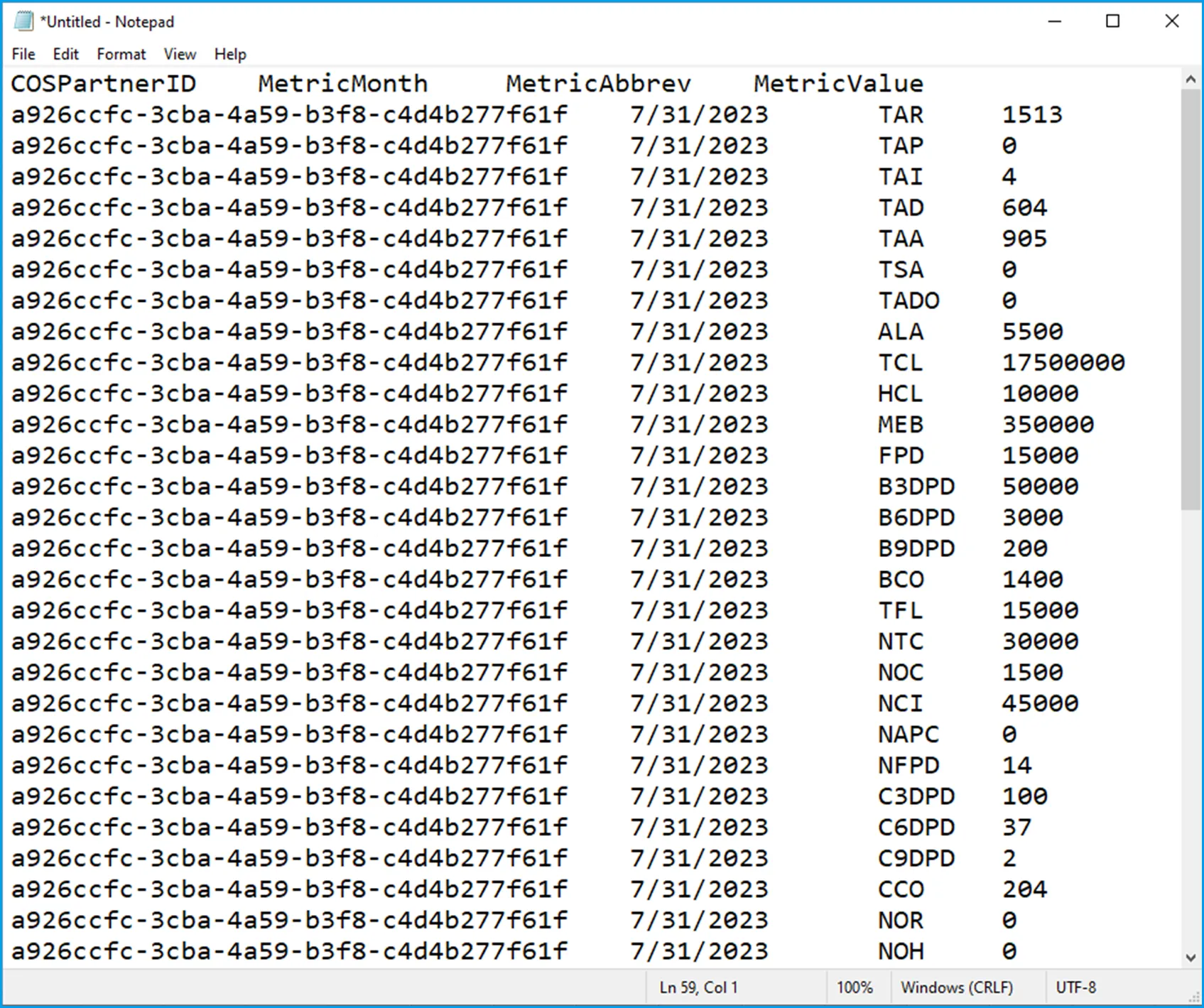
Partner ABCD, Inc. (No Sub-Partners)
The sample below presents the monthly credit risk metric report from a fictitious Cross River partner, ABCD, Inc, partner ID 7632bce6-5602-4e2b-b7e1-78b6017dc4b2, for the month of January 2025.
File Name: CreditRiskMetrics_ABCD_202503101750
File Format: .csv
- File name includes partner abbreviation ABCD to identify which partner the files belongs to.
- Date time stamp 202503101750 refers to the time the file was generated, in this case, March 10th at 17:50, irrespective of the date of the data included (January 2025).
- This partner has no need to report Sub-Partner data, therefore that optional column is not included.

Partner WXYZ, Inc. (Reporting data with Sub-Partners)
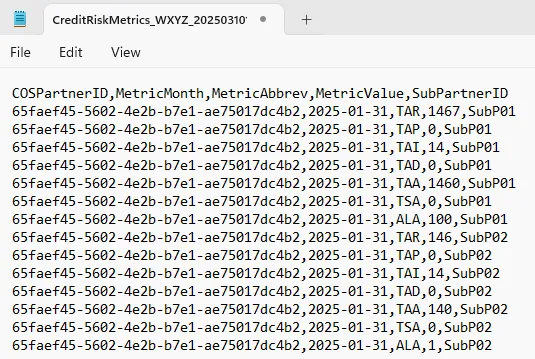
The sample below presents the monthly credit risk metric report from a fictitious Cross River partner, WXYZ, Inc. partner ID 65faef45-5602-4e2b-b7e1-ae75017dc4b2, for the month of January 2025. WXYZ, Inc. has two unique sub-partners to report data for: SubP01 and SubP02
File Name: CreditRiskMetrics_WXYZ_202503101750
File Format: .csv
- File name includes partner abbreviation WXYZ to identify which partner the files belongs to.
- Date time stamp 202503101750 refers to the time the file was generated, in this case, March 10th at 17:50, irrespective of the date of the data included (January 2025).
- This partner needs to report Sub-Partner data, so they must include the SubPartnerID for each record.
- The SubPartnerID is a text string. The value used must be unique and consistent.
Duplicate value handling
If a new metric file is submitted for a reporting month that has already been received for that month, Cross River will rely on the most recently provided version.
File share method
Share the .csv file monthly.
Upload the file using SFTP to your /ClientCredit subfolder in the SFTP site assigned to you.
If you do not yet have an SFTP folder with Cross River, contact your Cross River, refer to the Before you begin section of this page.
Troubleshooting
Issue | Resolution |
|---|---|
You don't know your Partner ID | Request your Partner ID form your |
You are notified by Cross River that there's a problem with the .csv file | If your .csv file has problems, Cross River will let you know what they are and how to fix them. |
In general, before sending, check these values for validity:
- Filename is formatted correctly
- For each record:
- COSPartnerID is correct
- MetricMonth (Month end date) is correct and in the correct format
- MetricAbbreviation is a valid one from provided list
- MetricValue is expressed as a number
- SubPartnerID, when applicable, contains a header and value expressed as strings