Daily chargeback report
Report description
Daily chargeback reports help you review and manage chargeback cases. This is not a financial report. Both new chargebacks and updates for ongoing cases appear in the same report file.
You receive this report using the Secure File Transfer Protocol (SFTP). SFTP lets you receive and send information securely.
This report is generated automatically, and pushed to your assigned subfolder on the secure server (usually at the path \\SFTP01\PTPs\PartnerName\PROD\CardNetworks\DailyReports\Chargebacks), where you access it.
IMPORTANT SFTP must be set up before you create a report request with Cross River’s Data Team. This allows the reporting team to automate the delivery of Settlement and Reconciliation reports to the appropriate folders.
Report distribution
Recipients include user-partners only.
Report structure
The chargeback report filename uses this convention: PartnerName_CRB_Chargebacks_Details_YYYY-MM-DD.csv
The chargeback report structure includes the fields presented here.
No. | Field | Required | Default | Description |
|---|---|---|---|---|
1 | CRBChargebackId | ✓ | | Unique reference number generated by Cross River for each chargeback case, used as the name of the evidence artifact |
2 | ExternalVendorID | ✓ | | |
3 | ✓ | |
| |
4 | OriginalTransactionRequestId | ✓ | | ID of the automatically created transaction associated with this settlement day - ARN |
5 | ReasonCode | | | Network-specific reason code that identifies the evidence the merchant must provide to win the case |
6 | ReasonDescription | | | Description corresponding to the network Exception Code |
7 | ChargebackRequestedAt | | | Timing of the dispute request |
8 | DaysOutstanding | | | Days since dispute was opened |
9 | | | | |
10 | AdjustmentType → when is populated - Recon should consume | | Financial record | Debit\Credit |
11 | AdjustmentAmount → when is populated - Recon should consume | | Financial record | AdjustmentAmount->2000 ChargebackAmount->5000 TransactionAmount->7000 |
12 | | | | |
13 | LastStatusDate | | | Date of most recent change in Action Status |
14 | CreditCardId | ✓ | | Token for the signed-up card, received when you first sign up the card. One token per card holder. |
15 | ChargebackAmount | | | Amount disputed by cardholder. May differ from the Original Settled Amount in the case of a partial chargeback or due to differences in the exchange rate. |
16 | Network | ✓ | | Card network the transaction was processed through |
17 | OriginalTransactionResponseCode | ✓ | | Original transaction - Card networks return response codes to approve or decline a transaction. They follow the standards set by ISO 8583:1987, which defines a specific message format so that different systems can communicate. Every network can adapt the standard for their own use |
18 | OriginalTransactionResponseDescription | ✓ | | Original transaction - Card networks return response codes to approve or decline a transaction. They follow the standards set by the International Organization for Standardization (ISO) 8583:1987, which defines a specific message format so that different systems can communicate. Every network can adapt the standard for their own use. |
19 | OriginalTransactionRequestedAt | ✓ | | Time when the transaction was requested by the partner. Dates in UTC. |
20 | OriginalActualTransactionAt | ✓ | | Time at which the transaction was processed by the network. Dates in UTC. |
21 | RetrievalReference | ✓ | | RRN |
22 | NetworkIdentifier | ✓ | | Network transaction identifier |
23 | OriginalTransactionAmount | ✓ | | Transaction Amount. Passed in to Create Transactions APIs
|
24 | NetworkFee | | | |
25 | InterchangeFee | | | Interchange fee |
26 | OriginalTranscationType | ✓ | |
|
27 | FirstName | | | |
28 | LastName | | | |
29 | CardBrand | | | |
30 | CardProductType | | | |
31 | First6 | | | |
32 | Last4 | | | |
33 | EvidenceInstructions | | | Default-Empty |
Complex field values
This section presents possible values for specific fields when they include a large number of possible values.
Chargeback state types
This table shows you values for the ChargebackState field. The type explains the stage of processing the chargeback reached at report generation time.
No. | Dispute state type | CB Type Description | Financial | Comments |
|---|---|---|---|---|
1 | First Chargeback | Initial Chargeback | ✓ | Settlement file is already debited |
2 | Merchant Response Review | Merchant Response received and under review | | |
3 | Outgoing Pre-Arbitration | Merchant Response was accepted and Outgoing Pre-Arb was created and submitted to Issuer (Visa Allocation Disputes only) | | |
4 | Representment | Merchant Response was accepted and Representment was processed | ✓ | |
5 | Incoming Pre-Arbitration | Issuer has responded to previously processed Representment and has submitted a Cardholder response via an Incoming Pre-Arbitration | ✓ | |
6 | Arbitration | An Arbitration Ruling has been filed by either the Issuer or Acquirer | | |
7 | Outgoing Pre-Compliance | Acquirer has submitted a Pre-Compliance request to the Issuer | | |
8 | Incoming Pre-Compliance | Issuer has submitted a Pre-Compliance request to the Acquirer | | If the merchant accept it - it becomes financial(step 5) |
9 | Compliance | A Compliance Ruling has been filed by either the Issuer or Acquirer | | |
10 | GFC | Good Faith Collection has been submitted by either the Issuer or Acquirer | | |
11 | Chargeback Reversal | See ARN and Internal Case# for reference to original Chargeback | ✓ | (The issuer recalled it within 3 days) |
12 | Duplicate Chargeback | See ARN and Internal Case# for reference to original Chargeback | ✓ | Imminently “fight” it and get the money back |
Resolution types
This table shows you values for the ResolutionType field. Resolutions are different ways a chargeback case is finished.
No. | Resolution Type | Resolution Type Description |
|---|---|---|
1 | Resolved to Merchant | Merchant is liable - see ActionStatus for next steps |
2 | Resolved to Issuer | Issuer is liable - See ActionStatus for update |
3 | Resolved to Write Off | Acquirer/Processor is liable |
4 | Merchant Response Denied | Submitted Merchant Response has been denied - See Action Status and Custom Filed for Reason |
5 | Pending (see Action Status) | Case is pending an external action - See Action Status and Custom Field for Reason |
6 | Issuer Denied Pre-Arb/Comp | See Action Status and Custom Field for Reason and Next Steps |
7 | Issuer Accepted Pre-Arb/Comp | Issuer has accepted liability |
8 | Acquirer Denied Pre-Arb/Comp | Acquirer has denied incoming case. Pending response from Issuer |
9 | Acquirer Accepted Pre-Arb/Comp | Acquirer has accepted liability on behalf of the merchant |
10 | Arb/Comp Ruling in Issuer Favor | Issuer has been deemed liable for the dispute |
11 | Arb/Comp Ruling in Acquirer Favor | Acquirer has been deemed liable for the dispute |
12 | Arb/Comp Ruling Withdrawn by Issuer | Issuer has withdrawn request for case ruling and has accepted dispute liability |
13 | Arb/Comp Ruling Withdrawn by Acquirer | Acquirer has withdrawn request for case ruling and has accepted dispute liability on behalf of the merchant |
14 | GFC Accepted by Issuer | Issuer has accepted liability |
15 | GFC Accepted by Acquirer | Acquirer has accepted liability on behalf of the merchant |
Actions
This table shows you values for the ActionStatus field. The action status inform you what you need to do next, or what was done last.
Action | Description | Chargeback Status | Terminal Status | Merchant Action Required |
|---|---|---|---|---|
Case Closed in Issuer's favor - No Further Recourse | See custom field for explanation | Lost | Yes | No |
Case Closed in Merchant's favor - Time Elapsed | Merchant win | Won | Yes | No |
Case Closed in Merchant's favor - Issuer Accepted | Merchant win | Won | Yes | No |
Merchant Response Needed - See Reason Code | Required compelling evidence inferred from dispute reason code | Open | No | Yes |
Merchant Response Needed - See Custom Field | Specific information required from merchant | Open | No | Yes |
Outgoing Pre-Arb Sent to Issuer Pending Issuer Response | Issuer has up to 30 days to respond | Disputed | No | No |
Outgoing Pre-Comp Sent to Issuer Pending Issuer Response | Issuer has up to 30 days to respond | Disputed | No | No |
Representment Processed back to Issuer | Issuer has 30–45 days to respond | Disputed | No | No |
Merchant Response needed for Incoming Pre-Arb/Comp | See custom field for explanation | Open | No | Yes |
Reversal processed to offset most recent process | See Chargeback Type | Open | No | |
Pending Arbitration Ruling from Card Brand | Case awaiting ruling from Visa or Mastercard | Disputed | No | No |
Case Closed in Merchant's favor - Card Brand Ruling | Card brand ruled in merchant's favor | Won | Yes | No |
Pending Issuer Response to Pre-Arb Denial from Acquirer | Issuer has 10 days to file arbitration | Disputed | No | No |
Responding to chargebacks
You can choose to either accept a cardholder’s dispute or respond to it with an evidence file that proves the cardholder has received the product/service.
These evidence files must have the case number as the file name (e.g. 123456789.pdf) and must be uploaded to the assigned subfolder in the secure server (usually at the path \\SFTP01\PTPs\PartnerName\PROD\CardNetworks\DailyReports\Response).
These responses are forwarded to Visa/MC, where they will determine who wins: the cardholder/issuing bank or the merchant/acquiring bank.
Cover letter
Below is an evidence package cover letter template, which you would attach on top of the evidence, such as a receipt:
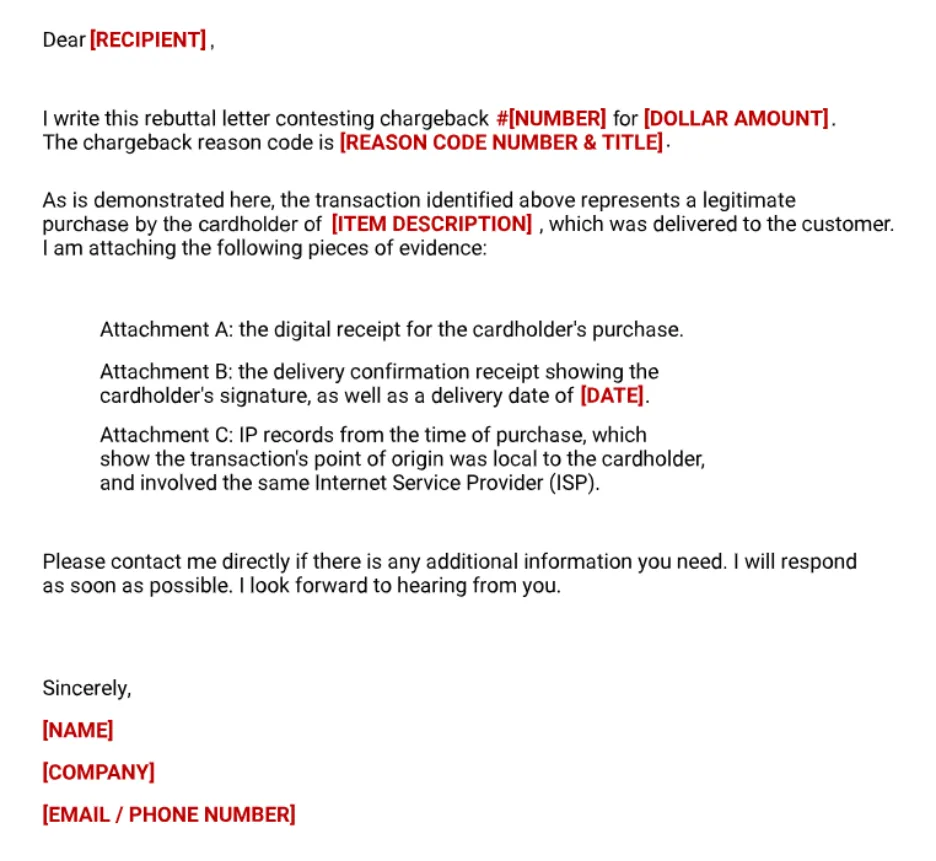
Evidence package
Merchant dispute Visa best practices
Chargeback integration handshake test
A full end‑to‑end chargeback lifecycle is not required to validate that the chargeback integration is functioning correctly. To test the integration handshake between Cross River and the partner, the following steps are needed:
- Partner initiates a chargeback: the Partner is responsible for initiating a chargeback against a PTPE pull transaction greater than $50.
- CRB Receives the Chargeback from the Network - CRB waits for the chargeback to be received in the CRB queue from the Network (Visa/Mastercard). This may take up to 10 business days from the time the cardholder initiates the dispute.
- CRB Enriches the Chargeback Case - Once the chargeback appears in the CRB queue, CRB ingests and enriches this data, allowing both CRB and the Partner to tie the case back to the original transaction.
- CRB Generates and Delivers the Chargeback File - CRB produces the chargeback file and deliver it to the Partner’s SFTP. This is how the Partner knows they received a new chargeback, as well as the latest status on an open case. Partners typically ingest these files to easily find information.
- Partner Responds to Chargeback by Uploading Evidence File
- The Partner can choose not to respond to the case. The Partner in this case would just not upload an evidence file and let the case expire.
- If the Partner chooses to counter the case, they would upload an Evidence File to their SFTP to prove that the good/service has already been provided to the customer.
Completing these steps validates the bidirectional communication handshake – confirming that CRB can successfully transmit required chargeback data to the partner and receive evidence files in return.