Send
This section has an accompanying tutorial video:
Information can be sent using the following interfaces.
Send Zone Message
Triggers a Zone Message Event with the same command parameter as the Send Zone Message command.
UDP
Sends a message to a networked device using the UDP protocol. Go to Presentation Settings > Interactive > Networking to specify the destination address and port for UDP messages.
Send IR Remote
Via the player’s 3.5mm IR Out port (availability depends on player model), Send IR Remote sends NEC-formatted commands while Send IR Remote (Pronto) sends commands using the Pronto Hex Code (PHC).
Many BrightSign players have a 3.5 mm jack which, when paired with a compatible IR transceiver, enables the player to send and receive IR commands. Presentations created with BrightSign Author can then be designed to instruct those players to send and receive IR commands at user-defined times. For example, a Remote Input Event can be created such that a specified remote control button will trigger the desired event.
Note that while the 3.5 mm jack on most players are capable of sending and receiving IR signals, some models (such as the XDx30) can only send IR signals. Refer to the hardware specifications for your specific player model.
IR Codes
IR-capable players are compatible with either NEC-formatted integer values or Pronto-formatted IR codes. These codes are available on sites like remotecentral.com as well as from the display manufacturer.
IR Transceivers
Many IR transceivers with TS type 3.5mm male jacks are compatible with BrightSign players. TRS/TRRS type male 3.5mm jacks are not supported.
This IR transceiver has been tested and proven to work with BrightSign players.
Events and States
IR commands can be set up for Events as well as a States.
IR Commands for an Event
To set up IR commands for an Event:
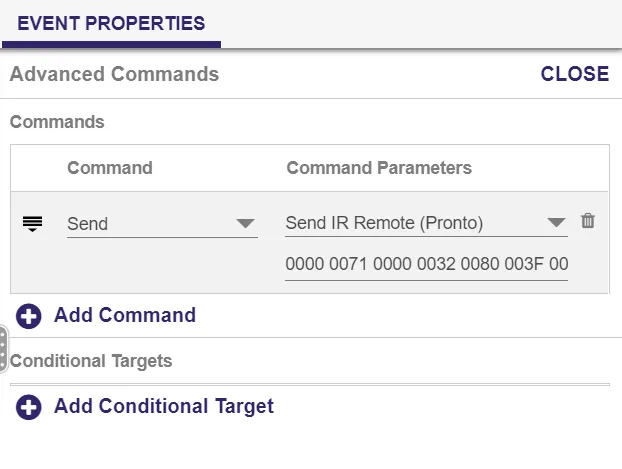
- The presentation must be Advanced.
- From the Content pane, select the Event during which the IR command will be in effect.
- Go to Event Properties > Advanced.
- Click + Add Command to add a command.
- Set the Command to Send.
- Use Command Parameters > Send IR Remote for NEC commands. Use Command Parameters > Send IR Remote (Pronto) for Pronto Hex commands.
IR Commands for a State
To set up IR commands for a State:
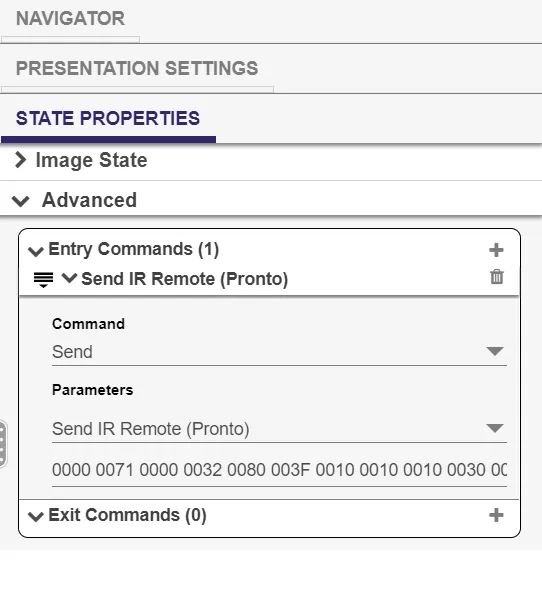
- The presentation must be Advanced.
- From the Content pane, select the State during which the IR command will be in effect.
- Go to State Properties > Advanced.
- IR commands for a State can be either an Entry Command or an Exit Command. Entry Commands are executed when the State is entered. Exit Commands are executed when the State is exited:
- To create an Entry Command, click + Add Command next to Entry Commands.
- To create an Exit Command, click + Add Command next to Exit Commands.
- Set the Command to Send.
- Use Parameters > Send IR Remote for NEC commands. Use Parameters > Send IR Remote (Pronto) for Pronto Hex commands.
Pronto IR Codes
When using Pronto-formatted IR codes, you may get a "pulse too long" error in the system log, and the code will fail to work. To fix this issue, change the last four characters of the IR code to all zeros. Below is a "power on" command before and after the change.
Before:
0000 0071 0000 0032 0080 003F 0010 0010 0010 0030 0010 0010 0010 0010 0010 0010 0010 0010 0010 0010 0010 0010 0010 0010 0010 0010 0010 0010 0010 0010 0010 0010 0010 0030 0010 0010 0010 0010 0010 0010 0010 0010 0010 0010 0010 0010 0010 0010 0010 0010 0010 0010 0010 0030 0010 0010 0010 0010 0010 0010 0010 0010 0010 0010 0010 0010 0010 0010 0010 0010 0010 0010 0010 0030 0010 0030 0010 0030 0010 0030 0010 0030 0010 0010 0010 0010 0010 0010 0010 0030 0010 0030 0010 0030 0010 0030 0010 0030 0010 0010 0010 0030 0010 0A98
After:
0000 0071 0000 0032 0080 003F 0010 0010 0010 0030 0010 0010 0010 0010 0010 0010 0010 0010 0010 0010 0010 0010 0010 0010 0010 0010 0010 0010 0010 0010 0010 0010 0010 0030 0010 0010 0010 0010 0010 0010 0010 0010 0010 0010 0010 0010 0010 0010 0010 0010 0010 0010 0010 0030 0010 0010 0010 0010 0010 0010 0010 0010 0010 0010 0010 0010 0010 0010 0010 0010 0010 0010 0010 0030 0010 0030 0010 0030 0010 0030 0010 0030 0010 0010 0010 0010 0010 0010 0010 0030 0010 0030 0010 0030 0010 0030 0010 0030 0010 0010 0010 0030 0010 0000
Serial string (EOL)
Sends the specified string to the specified serial port. This command adds a carriage return at the end of the string.
Serial string (no EOL)
Sends the specified string to the specified serial port. This command does not add a carriage return at the end of the string.
Serial byte
Sends the specified byte to the specified serial port. The byte must be entered in decimal format (0-255).
Serial bytes (comma separated)
Sends the specified bytes to the specified serial port in comma-separated format.
Most standard serial devices enumerate on port 0 (on the HO523, they will enumerate on port 1). If you are connecting a USB-serial device, it will enumerate on port 2.
Send Plugin Message
Sends the specified string to a Script Plugin attached to the presentation. Use the dropdown menu to select a desired script plugin. See Use Plugins & Parsers for more information on creating custom scripts that can receive plugin messages.