Fix errors and warnings
On this page, you will find common errors and warnings that you may encounter in and how to fix them.
Types of errors in
AccountValidationError | |
|---|---|
Type of error | AccountValidationError |
Cause | A module outputs the AccountValidationError when cannot authenticate you in the third-party app. For example, when you change your credentials in the app or your credentials expire and you don't update them in the connection, the app module will output the AccountValidationError. The AccountValidationError also appears also with the HTTP status codes 401 and 403. If a module outputs the AccountValidationError, the ends with an error. When your finishes with an error for the number of consecutive errors in a row, disables the scheduling of your . It is not possible to handle the AccountValidationError with an error handler, because the error happens during the intialization of the scenario. |
Solution | To fix the AccountValidationError, review your credentials in the app and the connection in . If necessary, create a new connection for the app. If you are getting the AccountValidationError frequently, contact our Support. |
BundleValidationError | |
|---|---|
Type of error | BundleValidationError |
Cause | A module outputs the BundleValidationError when the bundle that enters the module doesn't pass validation. Validation means that before processing a bundle in a module, checks whether data types match in the module mappings and whether there are no missing values in the module required fields. For example, you get the BundleValidationError when you map text to a module settings field that requires a date, or when you map an empty value to a required field in the module settings. If a module outputs the BundleValidationError with no error handling, the ends with an error. When your finishes with an error for the number of consecutive errors in a row, disables the scheduling of your . |
Solution | The best way to handle this error is to review your mapping in the module settings. For tips on how to handle missing data in a check out the article about how to fix missing data errors. |
ConnectionError | |
|---|---|
Type of error | ConnectionError |
Cause | A module outputs the ConnectionError when the third-party app is unavailable. For example, the third-party service might be offline because of maintenance. This error uses the HTTP 502, 503 and 504 status codes. The default handling of the ConnectionError depends on the following attributes:
|
Solution | To fix the ConnectionError, see the Fix connection errors page. |
DataError | |
|---|---|
Type of error | DataError |
Cause | A module outputs the DataError when data sent by the module doesn't pass validation on the third-party side. For example, when you try to create a tweet with the Twitter > Create a Tweet module that has more than 280 characters, the Create a Tweet module outputs the DataError because tweets have a maximum length of 280 characters. Another situation when you get the DataError is when you map an incorrect data type to a function. For example, when you map data with the text data type to the parseDateparseDate function. If a module outputs the DataError with no error handling, the ends with an error. When your finishes with an error for the number of consecutive errors in a row, disables the scheduling of your . |
Solution | |
DataSizeLimitExceededError | |
|---|---|
Type of error | DataSizeLimitExceededError |
Cause | A module outputs the DataSizeLimitExceededError when you run out of data transfer quota. Your data transfer limit is calculated from the credits limit. If a module outputs the DataSizeLimitExceededError with no error handling, the ends with an error. Because the DataSizeLimitExceededError is a fatal error, immediately disables the scheduling, regardless of the number of consecutive errors. |
Solution | To fix the DataSizeLimitExceededError, consider buying extra creditsextra credits or upgrading your organization's subscription plan. |
DuplicateDataError | |
|---|---|
Type of error | DuplicateDataError |
Cause | A module outputs the DuplicateDataError when you send the same data to a module that doesn't allow duplicates. For example, when you try to create a new user in an app and the user's e-mail address has to be unique, but the e-mail address is used already. The module outputs the DuplicateDataError, because the e-mail address is registered with another user already. If a module outputs the DuplicateDataError with no error handling, the ends with an error. When your finishes with an error for the number of consecutive errors in a row, disables the scheduling of your . |
Solution | If you get the DuplicateDataError in your , you should review your design. For example, if you are using a database, you could first check if the database record exists with a search module. Or with the email example, you could just ignore the error with the Skip error handler. |
IncompleteDataError | |
|---|---|
Type of error | IncompleteDataError |
Cause | A module outputs the IncompleteDataError when the module can get only part of the data from the third-party app. For example, when you are uploading new photos to Google Photos and you have a that downloads the photos at the same time. tries to download the photo that you are currently uploading. The photo file won't be complete and the Google Photos module will output the IncompleteDataError. If a module outputs the IncompleteDataError with no error handling, the ends with an error. pauses the scenario for 20 minutes and then runs the again until the succeeds or reaches the number of consecutive errors. |
Solution | If you want to handle the IncompleteDataError, you can use the Retry error handler. |
InconsistencyError | |
|---|---|
Type of error | InconsistencyError |
Cause | A module outputs the InconsistencyError when an error happens during the rollback. This error can occur when you make changes to a data store with two that run at the same time. If one encounters an error and attempts to undo the changes in the rollback phase, but the other already finished making changes, the changes cannot be safely undone and you get the InconsistencyError from the data store module in the first . For example, imagine two people making changes in the same part of a file. One of them saves changes before the other. What happens with the changes from the other person? If a module outputs the InconsistencyError with no error handling, the ends with an error. Because the InconsistencyError is a fatal error, immediately disables the scheduling, regardless of the number of consecutive errors. |
Solution | To fix the InconsistencyError, check your data and fix the data if necessary. If you are getting the InconsistencyError frequently, check the that use the database. |
MaxFileSizeExceededError | |
|---|---|
Type of error | MaxFileSizeExceededError |
Cause | A module outputs the MaxFileSizeExceededError when you try to process a file that exceeds the maximum file size. The maximum file size differs based on your organization's subscription. You can check the maximum file sizes in the pricing. For example, if you use the Google Drive > Move a file module in an organization with the Core plan to move a file larger than 100 MB, you would get the MaxFileSizeExceededError. If a module outputs the MaxFileSizeExceededError with no error handling, the ends with an error. When your finishes with an error for the number of consecutive errors in a row, disables the scheduling of your . |
Solution | To fix the MaxFileSizeError, you have to either make the file smaller (compress or split the file) or upgrade your organization's subscription plan. |
ModuleTimeoutError | |
|---|---|
Type of error | ModuleTimeoutError |
Cause | This error occurs due to a module timeout when a request sent by a module does not receive a response within the expected timeframe. If the endpoint does not return any data, the module waits for a response for up to 40 seconds (most modules have a runtime limit of 40 or 60 seconds). When this limit is exceeded, Make returns a ModuleTimeoutError - The Operation timed out error. This issue typically occurs when the external server delays its response because of temporary service issues or server overload. |
Solution | To fix this issue and prevent the scenario from failing, configure a Retry error handler and enable the storage of incomplete executions. When configured, the Retry directive automatically retries the same action up to three times, with delays of 5, 10, and 15 minutes. If the error persists after all retry attempts, the execution is stored under the Incomplete Executions tab, where it can be reviewed and resolved manually. If incomplete execution storage is enabled without adding a Retry error handler, failed runs are still stored under the Incomplete Executions tab. However, no automatic retry attempts will be made, and the executions must be resolved manually. Detailed setup instructions are available in the resources linked below: To increase the timeout for custom apps, see our Developer Hub documentation. |
Example | Airtable timeout error An occurs when the Airtable server doesn't respond within Make's timeout window. It's typically caused by a temporary delay on Airtable's end rather than an issue with your scenario configuration. Make waits 40 seconds for a response (Airtable has an extended timeout of up to 80 seconds), but when the external server is slow to respond, the request times out. To fix this:
By doing so, temporary delays on Airtable's end won't cause your scenario to fail permanently, it will retry automatically and recover most of the time. If timeouts continue: You can also review your Look For Changes settings to see if narrowing the search criteria or reducing the number of records processed helps. 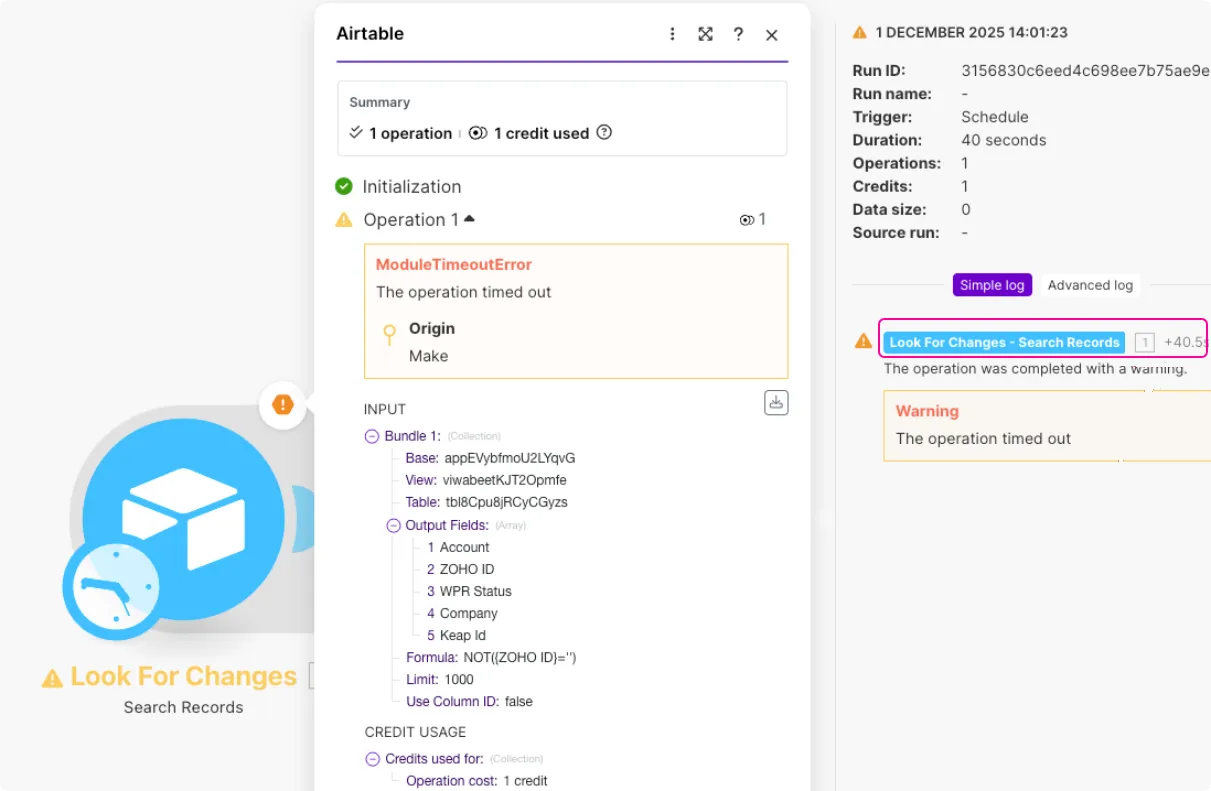 |
OperationsLimitExceededError | |
|---|---|
Type of error | OperationsLimitExceededError |
Cause | A module outputs the OperationsLimitExceededError when you run out of credits. Your credit limit is set with your organization's subscription. You can check your credit limit in pricing. If a module outputs the OperationsLimitExceededError, the ends with an error. Because the OperationsLimitExceededError is a fatal error, immediately disables the scheduling, regardless of the number of consecutive errors. |
Solution | To fix the OperationsLimitExceededError, consider buying extra creditsextra credits or upgrading your organization's subscription plan. |
RateLimitError | |
|---|---|
Type of error | RateLimitError |
Cause | A module outputs the RateLimitError when you make too many requests over a time period to the app API. This error uses the HTTP 429 status code and follows the rate-limiting rules of the third party. For example, the Make appMake app modules output the RateLimitError when you reach the number of API calls per minute based on your subscription. The default handling of the RateLimitError depends on the following attributes:
|
Solution | To fix the RateLimitError, see the Fix rate limit errors page. |
Types of warnings in
RuntimeError | |
|---|---|
Type of error | RuntimeError |
Cause | A module outputs the RuntimeError when the error reported by the third-party app doesn't meet the criteria for any other error type. For example, you get the RuntimeError when you use up all your tokens with the OpenAI > Create a Completion module. If a module outputs the RuntimeError with no error handling, the ends with an error. When your finishes with an error for the number of consecutive errors in a row, disables the scheduling of your . |
Solution | There's no general rule to fixing the RuntimeError. Check the error message in the history or try to reproduce the error with the Make DevToolMake DevTool. The Overview of error handling topic can help you create your error handling strategy. |
OutOfSpaceError | |
|---|---|
Type of warning | OutOfSpaceError |
Cause | Data store modules output the OutOfSpaceError when cannot store any more data in the data store. You also get the OutOfSpaceError when you fill your incomplete execution storage. If a module outputs the OutOfSpaceError with no error handling, the ends with a warning. The doesn't process the remaining bundles. will keep scheduling further runs. |
Solution | To fix the OutOfSpaceError in a , you can use a backup data store with the Resume error handler. You should also check the data in the data store or your incomplete execution storage. You can also review the pricing. |
ExecutionInterruptedError | |
|---|---|
Type of error | RuntimeError |
Cause | A module outputs the ExecutionInterruptedError when the runs for more than 45 minutes (10 minutes for the Free subscription). The module that is currently processing data outputs the warning. When a module outputs the ExecutionInterruptedError the ends with a warning. The doesn't process the remaining bundles. will keep scheduling further runs. |
Solution | To fix the ExecutionInterruptedError, consider strategies to optimize your :
|