Tenure Milestones
What is a tenure milestone?
A tenure milestone is an increase to an employee's time off entitlement based on how long they've worked at your company. For example, you might give employees 15 days of PTO in their first five years, then bump that to 20 days once they hit their ten-year anniversary.
Once an employee reaches a milestone, that new entitlement becomes their baseline going forward. It stays in place until they reach the next milestone.
When milestones get awarded
You choose when an employee's new entitlement kicks in. There are two options:
On the employee's anniversary date
The new entitlement starts the day the employee actually hits the milestone. If someone's three-year anniversary falls on June 15, their higher balance starts June 15, no matter where that falls in your plan year. These can be prorated or allocate the full amount.
At the start of the plan year
The new entitlement starts on the first day of your next entitlement year, even if the employee's actual anniversary falls somewhere in the middle of it. This keeps every employee's balance change lined up with the same reset date.
Full award or prorated
You also choose how much of the new entitlement an employee gets in the year the milestone happens:
- Full award: The employee gets the entire new entitlement right away, even if their milestone lands partway through the year.
- Prorated: The employee gets a partial amount for the rest of that year, based on how much of the year is left. The following year, they move to the full new entitlement.
Example
Policy | Before 5 years | After 5 years |
|---|---|---|
PTO days per year | 15 | 20 |
Sarah joins on April 1, 2023. She hits her three-year milestone on April 1, 2026. Your plan year runs January to December.
Example 1: Full award
Milestone set to anniversary date + full award.
Sarah's balance jumps straight from 15 to 20 days on April 1, 2026, the exact day she hits three years. She gets the entire 5-day increase at once, with no partial amount and no waiting for the next plan year.
Example 2: Prorated award
Milestone set to start of plan year + prorated.
Sarah's milestone falls on April 1, 2026, which is 9 months before the next plan year starts (January 1, 2027). Instead of waiting the full 9 months for her increase, she gets a prorated slice of it added to her existing balance for the rest of 2026:
- Extra days available: 20 minus 15 = 5 days
- Months left in the plan year after her milestone: 9 of 12
- Prorated amount: 5 days times (9 divided by 12) = 3.75 days
- Sarah's balance for the rest of 2026: 15 plus 3.75 = 18.75 days
On January 1, 2027, when the new plan year starts, Sarah moves to the full 20 days.
Note: Once a milestone takes effect, it becomes the new baseline. Employees don't drop back to their old entitlement. Each new milestone builds on top of the last one.
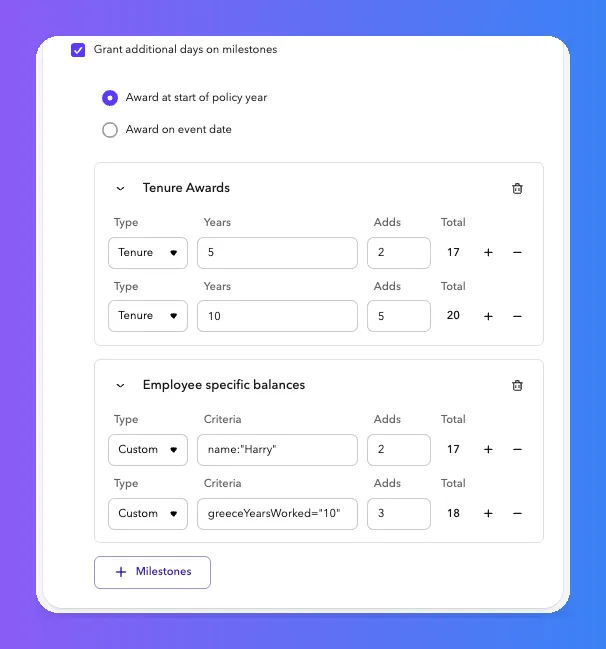
Within a group vs. across groups
You can add multiple milestones inside one group, and you can create multiple groups. The two behave differently:
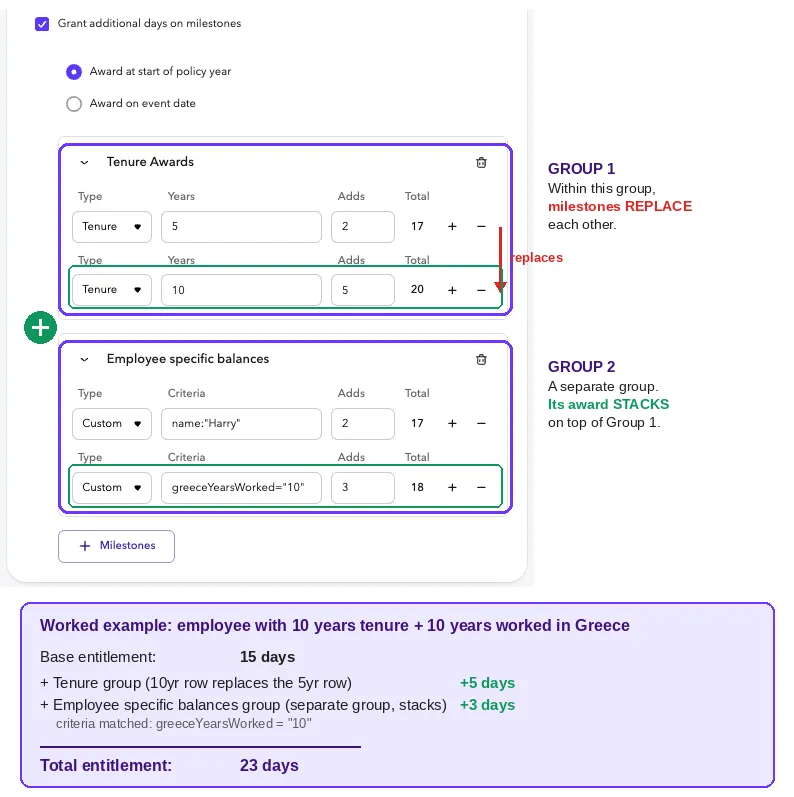
- Within the same group, milestones replace each other. Only the highest milestone an employee currently qualifies for applies. It doesn't add to the milestones below it.
- Across different groups, awards stack. If an employee qualifies for milestones in more than one group at the same time, each group's award adds together on top of the base entitlement.
Example
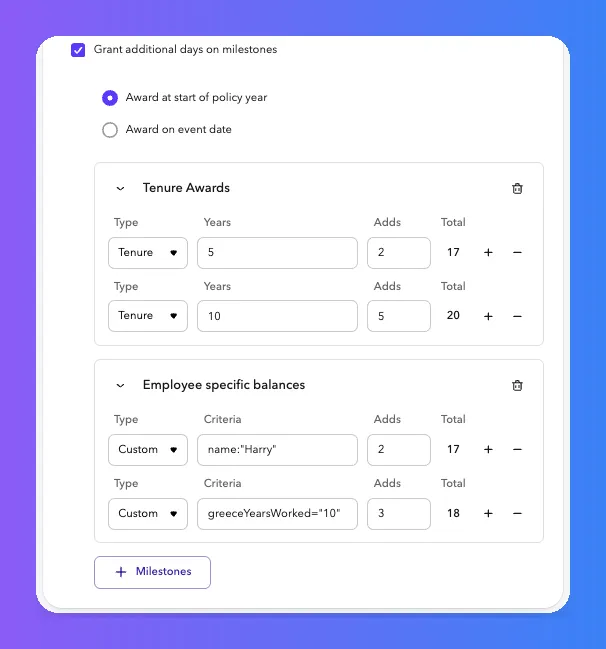
Say your Tenure group awards 5 extra days at the 5-year mark, and a separate custom group awards 3 extra days to employees with 10 years worked in Greece.
An employee with 5 years of tenure and 10 years worked in Greece qualifies for both groups at once. Because the awards come from two different groups, they stack: 5 days plus 3 days equals 8 extra days added to the base entitlement.
Setting up milestones
You set up milestones inside your time off policy. For each milestone, you'll define:
- The length of service that triggers it (for example, 5 years, 10 years)
- The new entitlement amount
- Whether it starts on the anniversary date or the start of the plan year
- Whether the first year is a full award or prorated
You can set up as many milestones as your policy needs, so an employee's entitlement can keep growing at 3 years, 5 years, 10 years, or whatever schedule fits your company.
Step 1: Turn on milestones
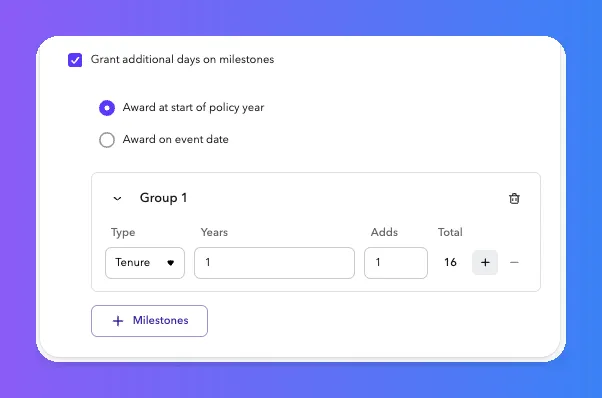
Inside your policy, check the box to grant additional days on milestones.

Step 2: Choose your timing and add your first milestone
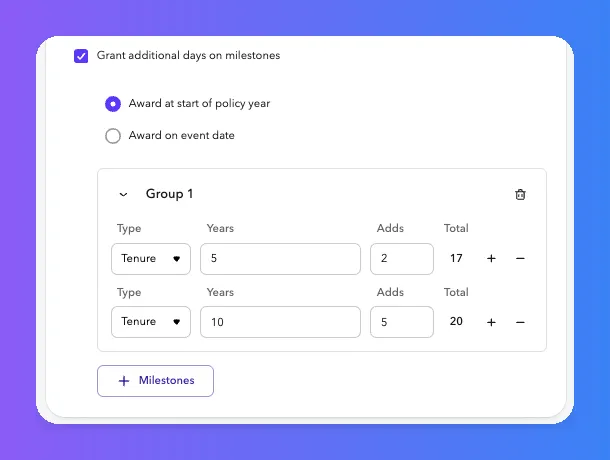
Pick whether awards happen at the start of the policy year or on the event date (the employee's actual anniversary), then add a milestone group. In this example, employees get 1 extra day at their 1-year mark, bringing their total to 16 days.
Step 3: Stack additional milestones
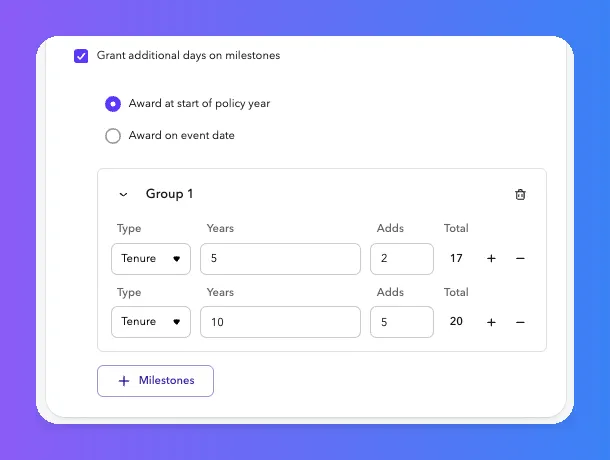
Add as many tenure milestones as your policy needs. Here, employees also get 2 extra days at 5 years (17 total) and 5 more at 10 years (20 total). Each milestone REPLACES on the one before it.
Step 4: Add custom triggers, like employee-specific balances if you need them
Beyond standard tenure milestones, you can create a separate group for one-off or criteria-based adjustments, like a named employee or a custom field such as years worked in a specific country. These STACK on top of the tenure awards.