
Managing data sheet and calendar syncs
The Live Queries page allows ChartHop Owners to view and revoke access to any external data syncs created at you organization. Those include:
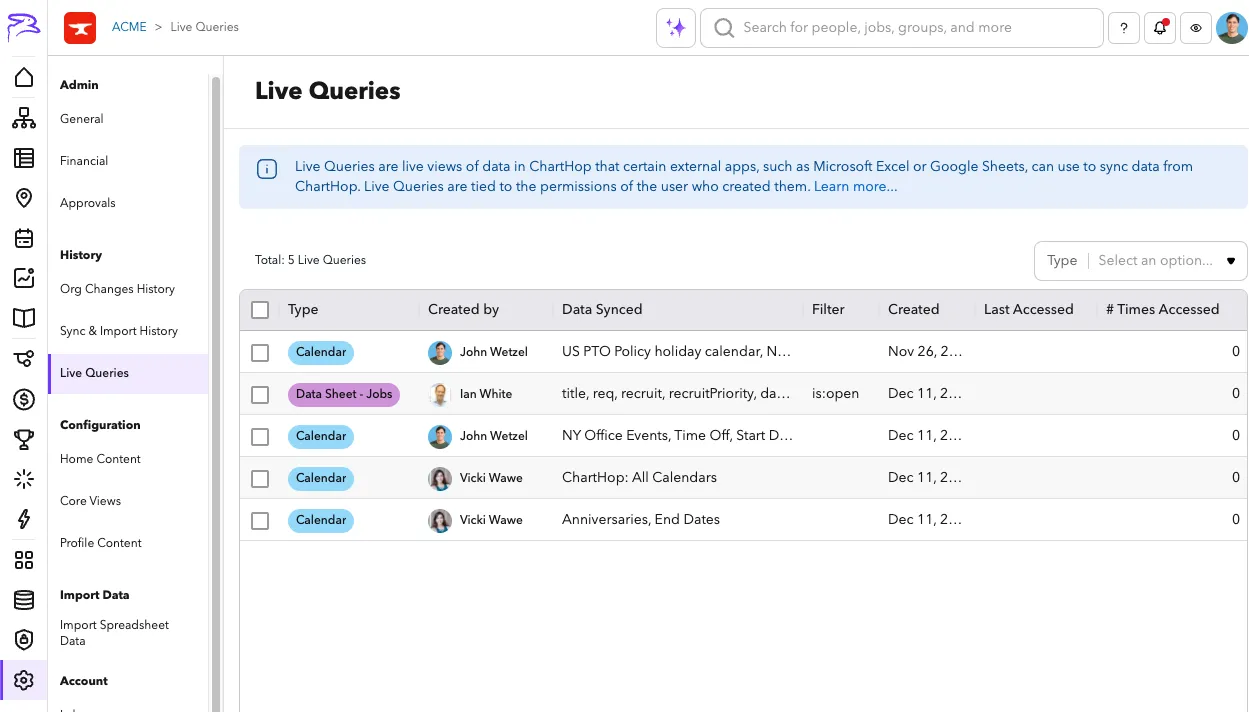
Live queries page overview
- Type - Calendar, Data Sheet - Jobs or Data Sheet - Persons
- Created by - Who created the sync (this users permissions always apply to the synced data)
- Data Synced - What data they are syncing
- Calendar - lists the calendars
- Data sheet - lists the field codes
- Filter - if a filter was applied (Data sheet only)
- Created - When it was created.
- Last Accessed - Date when the data was last pulled
- # Times Access - The number of times that the data has been updated or synced.
To delete a sync and revoke access
- Navigate to Setting > Live Queries
- Select the sync that you would like to delete
- Press Delete from the bulk actions menu.
- Confirm the deletion.