Interpret Autorun Logs
The autorun.brs file, located in the root of player storage, may contain one of several possible automatically-executed scripts. These scripts perform player initialization, setup, recovery, and the main player workflow. During execution, most of these scripts may produce log files containing information about events and state transitions happening on the player.
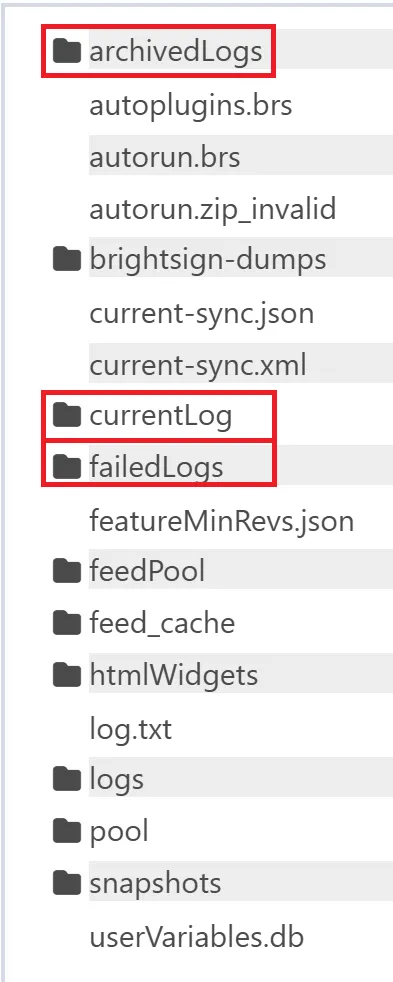
When enabled, these logs files are stored in several different folders. The one containing information about pending events is stored in the /currentLog folder, and is rotated daily or after player reboot. There is an option to enable log uploads to the cloud/server, either on startup or at a specific time of the day. This can be enabled in the Player Settings > Logging section of the Admin > Setup screen. Logs that are successfully uploaded are moved to the /archivedLogs folder. If uploading fails after multiple attempts, the logs are placed in the /failedLogs folder instead. See Image 1, below:
Each autorun log file may contain up to five kinds of records:
- Diagnostic (starting with L=d)
- Playback (starting with L=p)
- Event (starting with L=e)
- State (starting with L=s)
- User variable (starting with L=u )
Each entry type can be enabled or disabled during the player setup process and adjusted in the Player Settings panel after registration. Each log file in the folders mentioned above has a header section which may contain the following properties:
Name | Description | Example |
|---|---|---|
BrightSignLogVersion | Logs implementation version. Possible values: 2, 3, 4 | 4 |
SerialNumber | BrightSign Unit Serial Number | 46D89C101139 |
Account | BSN.com/BSN.Cloud Network Name | JaneDoe |
Group | Group name of the player | Default |
Timezone | Client (unit) timezone as set in registry | EET |
LogCreationTime | Time when log file created | 2025/07/25 15:59:24.350 |
IPAddress | IP address of unit | 172.16.0.85 |
FWVersion | Firmware version that the player runs on | 9.0.168 |
ScriptVersion | Autorun version | 10.0.100 |
CustomScriptVersion | Custom Autorun Version | 10.0.100 |
Model | Model description | XC4055 |
Diagnostic Log
The diagnostic log entries capture information about I/O operations and low-level errors reported by the BrightSign OS, which makes them useful during troubleshooting. These kind of entries begin with the L=d key-value pair. Other key-value pairs in these entries have the following meaning:
- T: A timestamp indicating when the diagnostic log was recorded
- I: A unique identification number for the system event, one of the values listed in the Event Type Codes section
- D: Arbitrary data related to the current event, which may include current firmware/autorun version numbers (see below)
Example
L=d T=2024/10/31 11:48:53.491 I=1023 D=9.0.16 10.0.100 10.0.100
Event Log
The event log entries capture information about the events that happened in specific presentation zones or in the shared presentation assets. These kind of entries begin with the L=e key-value pair. Other key-value pairs in these entries have the following meaning:
- S: The name of the state affected by the event
- T: A timestamp indicating when the event occurred
- E: One of the event types listed in the Event Types section
- D: Arbitrary data related to the current event
- A: A flag indicating whether the event was acted on (“1”) or not acted on (“0”)
Example
L=e S=earth_1280x720.mov09bce968-4c77-4775-b314-b2388cd77abb T=2024/10/31 11:48:55.086 E=mediaEnd D= A=1
Playback Log
The playback log entries capture information when a particular piece of media has been displayed on a screen. These kind of entries begin with the L=p key-value pair. Other key-value pairs in these entries have the following meaning:
- Z: The name of the zone in which the playback occurred
- S: A timestamp indicating when playback started
- E: A timestamp indicating when playback ended
- I: The media type of the file being played (e.g. “image”, “video”, “audio”)
- N: The name of the content file being played
Example
L=p Z=Video or Images S=2024/12/11 00:00:00.656 E=2024/12/11 00:00:29.172 I=video N=KO_Caps_v1_30p_Subway_28s.mp4
State Log
The State log entries capture information about state transitions that happen during presentation playback. These kind of entries begin with the L=s key-value pair. Other key-value pairs in these entries have the following meaning:
- S: The new state name
- T: A timestamp indicating when the state was entered
- Y: One of the state type listed in the State Types section
- LS: The previous state name
- LE: The type of event that transitioned to this state
- LD: The arbitrary data related to the event that transitioned to this state
Example
L=s S=earth_1280x720.mov09bce968-4c77-4775-b314-b2388cd77abb T=2024/10/31 11:53:55.951 Y=video LS=Panorama.jpgcee716ef-6d47-4f85-9496-2fbe385b1667 LE=mediaEnd LD=
User Variable Log
The User Variable log entries capture keys and values of user variables defined within a presentation. These kind of entries begin with the L=u key-value pair. Other key-value pairs in these entries have the following meaning:
- T: A timestamp indicating when the event occurred
- E: One of the event types listed in the Event Types section
- N: The name of the user variable
- C: The current value of the user variable
- D: The default value of the user variable
Example
L=u T=2024/10/31 11:48:55.086 E=mediaEnd N=PlayerName C=MyPlayer D=Unknown