Local Playlist State
3 min
To use Local Playlist, you must be in Interactive mode.
The Local Playlist allows you to see and update the playlist content on selected players in a group. This lets you have certain players within a group play different content while the rest play the default content.
State Properties
- Name: The name of the Local Playlist
- Initial State: Select this to make this state the home screen
Default Playlist
This section displays the default playlist content of your players.
Advanced
This section lets you add commands to your presentation to extend its functionality. See Commands & Conditional Targets for more info.
Local Playlist State
- Add a Local Playlist widget to your content in the center pane
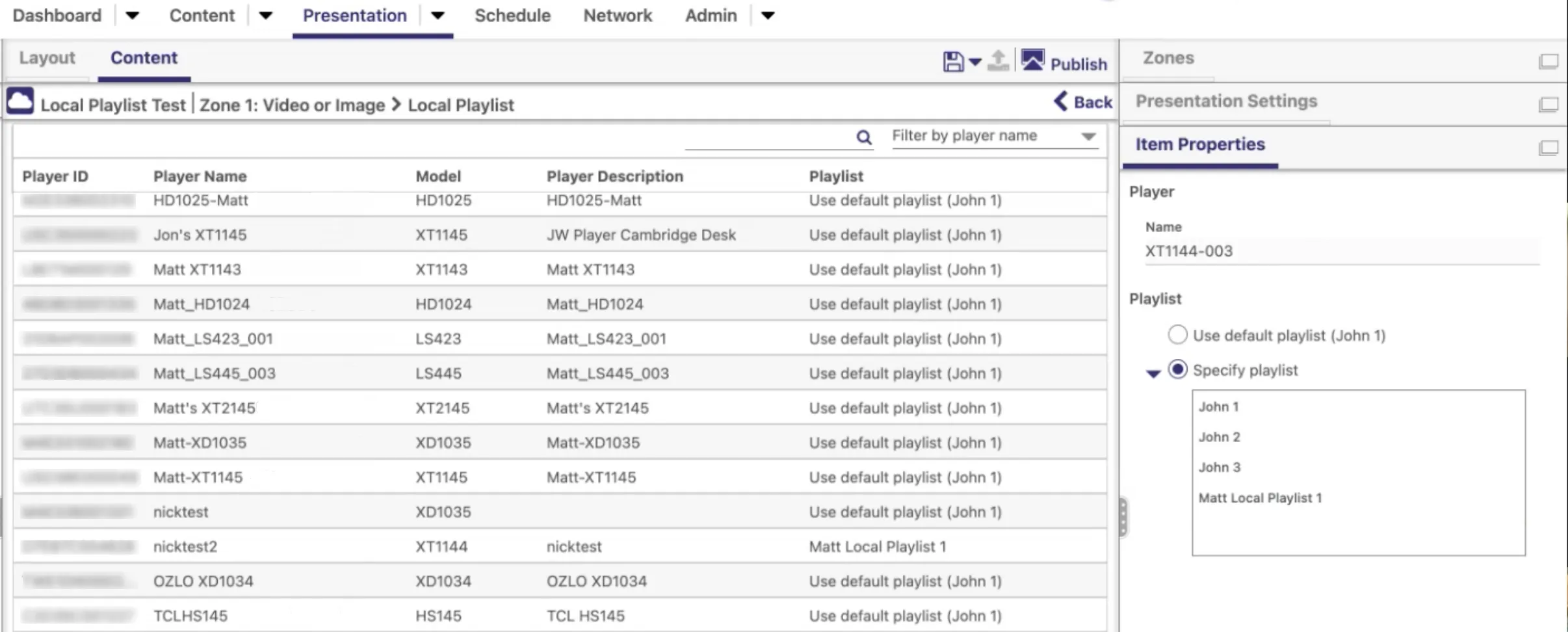
- Double click on the Local Playlist icon to see the players in a group and their assigned playlist under the Playlist column (see Image 1 below).
- Select a player and Specify playlist to assign certain players to play different presentations (in the image, one player is assigned to “Matt Local Playlist 1” while the other players in the group play the default playlist). Or use the filter or search features to see/change playlists content for a subset of players.