Use access token
Token use
Once you've successfully authenticated, an access_token is returned to you. Include this token in the header of your API calls.
The access token expires after a set period of time. The response containing the token also specifies the expiration time in seconds. Store and use your access token until it expires. We recommend you use the token until you receive a 401 unauthorized error, and then request a new token.
IMPORTANT
- Do not request a new token for every API request.
- Make sure to protect your token. Anyone who steals your token can impersonate your client for the lifetime of the token.
API request header
In the header of each API request, include the access token as follows:
curl --location --request 'POST https://sandbox.crbcos.com/Wires/v1/payments' \
--header 'Authorization: Bearer [YOUR TOKEN HERE]' \
--header 'Content-Type: application/x-www-form-urlencoded' \
--data-raw '{
  "accountNumber": "2255685659",
  "businessFunctionCode": "CTR",
  "receiverRoutingNumber": "021000021",
  "beneficiaryFi": {
    "idCode": "F",
    "identifier": "021000021",
    "name": "JP Morgan Chase"
  },
  "beneficiary": {
    "idCode": "D",
    "identifier": "123456789",
    "name": "Peter Griffin"
  },
  "beneficiaryReference": "XYZ123",
  "amount": 10000,
  "purpose": "payment"
}'
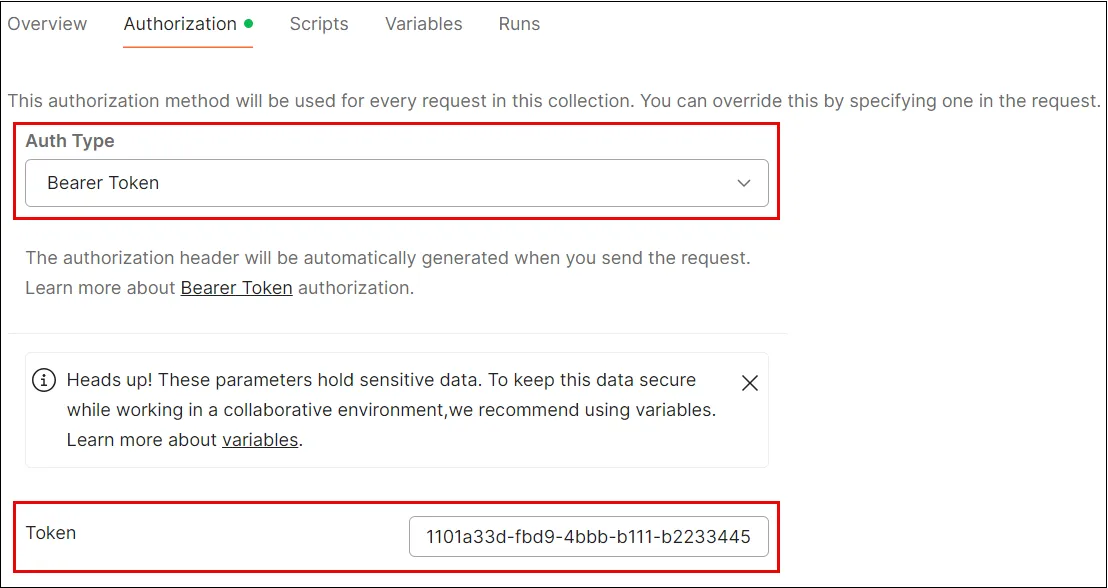
Postman
To use a token in Postman, navigate to the Authorization tab in your request, select Bearer Token as the authentication type, and paste your token into the provided field. Postman will automatically add the Bearer prefix and the token to the Token field.