Get access token
Token retrieval
Cross River uses OAuth 2.0 for authentication and authorization. This controls entry to our system and ensures that only authorized entities can access our APIs and other protected resources. The information you enter into our authentication system is confidential and can never be accessed from any other Cross River applications.
Once you've received your API credentials, and before you can use our APIs, you must get an access token using the client_id and client_secret you received when you registered. This access token allows you to send information securely as a JSON object for use in our APIs. You must include this token in the header of each API request.
There are several ways to request and receive an access token:
- Use Command Line Interface (CLI) with cURL or any other language
- Use Postman or any other API testing tool
Once obtained, copy the access token to your clipboard. Make sure you save it.
Command Line Interface
To request a token send a POST connect/token command containing the client_id and client_secret and grant_type to the authentication server (auth server) of the appropriate sandbox, as shown in the sample below.
Refer to the HTTP components table for an explanation of these tags.
The following example uses cURL to request a token from one of the auth servers.
curl --location --request POST 'https://idptest.crbcos.com/connect/token' \
 --header 'Content-Type: application/x-www-form-urlencoded' \
  --data-urlencode 'client_id=[your id here]' \
 --data-urlencode 'client_secret=[your secret here]' \
 --data-urlencode 'grant_type=client_credentials' \
 --data-urlencode 'audience=https://api.crbcos.com/'
{ "access_token": "contains many characters", \
"expires_in": 86400, \
"token_type": "Bearer" }Postman
To request a token using Postman, send a POST connect/token command to the auth server of the appropriate sandbox. Add the grant_type, scope (optional), client_id and client_secret to the call.
Refer to the HTTP components table for an explanation of these tags.
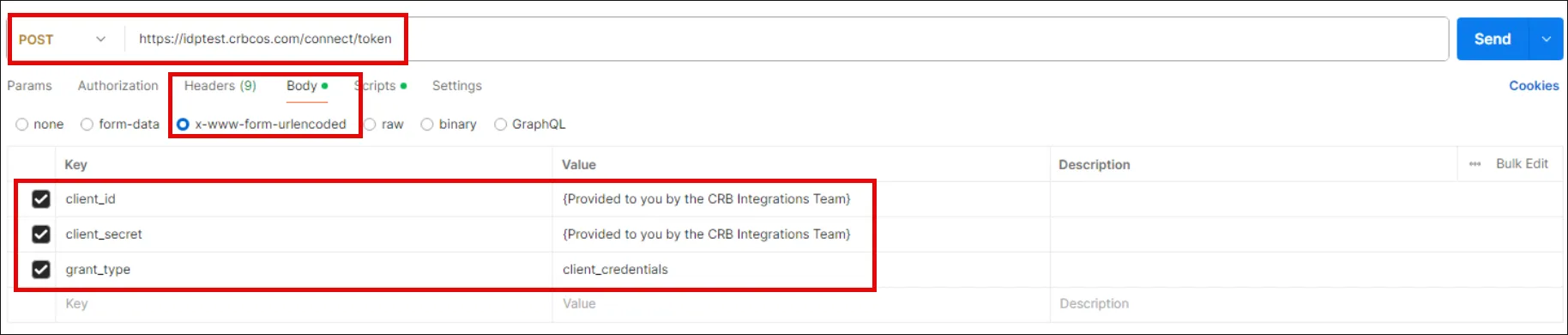
If the authentication is successful, the status code is 200 (OK).

Token request response
Attribute | Description |
|---|---|
access_token | A digitally signed JSON web token (JWT) sent from the oAuth server that allows access to specific Cross River resources |
scope | A range of services that a user can access |
expires_in | The amount of time until the token expires. - Our Integration Team will inform you of the expiration time or you can decode your access token as well. - We recommend that you retrieve a new access token a short time before the old token is set to expire. - Reuse tokens for their entire lifespan rather than getting a new token for each call to the same protected resource (API). IMPORTANT: Never decode your token on a publicly hosted website |
token-type | Bearer token |
HTTP components
The following HTTP components are used both in the API and Postman requests.
HTTP component | Tag | Description |
|---|---|---|
Endpoint | POST /connect/token | Endpoint for retrieving an access token |
Header | content-type | application/x-www-form- urlencoded |
Body | client_id | The unique identifier for a client |
Body | client_secret | An encrypted string of characters used to sign and validate ID tokens. Important: Secrets aren't recoverable by CR. If you lose a secret, a new one must be generated. Do not commit your secrets into source control. |
Body | grant_type | This field will always have a value of client_credentials |
Body | audience optional | A way for the user to validate if a particular access token is meant for them. |
Body | scope optional | A specific range or a limited set of services that a user can access with an access token. If a scope isn't specified, the token returned will contain all scopes associated with your credentials. Note: Multiple scopes can be sent in the same request by adding a space between the name of each scope. For example: 'scope=scope1 scope2 scope3' |
Auth server URLs
Module | Auth server URL |
|---|---|
Accounts | |
ACH | |
Wires | |
Checks | |
Core | |
Instant payments | |
Card issuing | |
Card payments | |
Lending |
Troubleshooting
If the authentication token is valid, it will return a 200. If the authentication token isn't valid, it will return a 401.
If you unable to get a bearer token and you haven't received one in the past:
- Confirm the URL.
- Check that the client_id and client_secret are typed correctly. They are case sensitive.
- Check your client_id and client_secret against the one you received.
- Make sure there are no network or allowlist issues.
Contact our Integration Team if your account is locked as a result of 3 incorrect log in attempts.