Add loan documents
Purpose of call
Use this call to:
- Post loan documents
- Add loan documents upon Cross River request
POST /Loan/{loanId}/Attachments
Request URL : https:// ... /Loan/{Id}/Attachments (endpoint below)
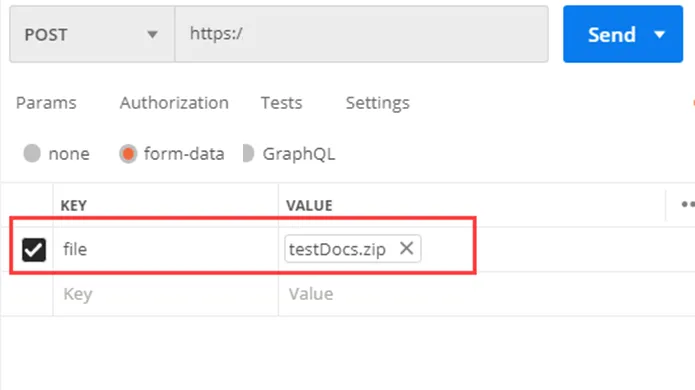
To add attachments:
- Zip all the relevant documents
- You can send multiple zip files
- Zip max size is set at 120 MB
- Files within the zip folder have to follow the naming convention
- Name the file with the {Arix GUID}.zip
- POST the documents
IMPORTANT The status of a loan remains Received until all the required documents are received by Arix. No webhook is sent to report that docs are incomplete.
File Naming convention
The naming convention requires that the end of a file name (before the file extension), ends with a dash (-) followed by a document-type code.
Example
- Loan agreement {JoesCreditReport}-LA.pdf
- Social Security card {JoesCreditReport}-SC.pdf
Identification documents
Type | Suffix |
|---|---|
Certificate of Citizenship | -CertificateCitizenship |
Court approved name change | -NameChangeCert |
Credit card *As a secondary form of ID only | -CC |
Credit report | -CR |
Debit card * As a secondary form of ID only | -DC |
Drivers license | -DL |
Insurance card | -InsuranceCard |
Marriage Certificate | -MarriageCert |
Military ID | -MilitaryID |
Miscellaneous ID documents | -MID |
Passport | -PP |
Permanent resident card | -RC |
Proof of address jpeg, jpg, png or pdf provided as POA | -POA |
Rental lease agreement | -LeaseAgreement |
Selfie Used to verify the ID | -SLF |
Social Security card *As a secondary form of ID only | -SC |
State Issued ID | -SID |
Utility Bill | -UtilityBill |
Work visa | -WorkVisa |
Credit documents
Type | Suffix |
|---|---|
Bankruptcy Watch | -BankruptcyWatch |
Credit memo | -CreditMemo |
Credit report | -CR |
Credit report (hard pull) | -CR_HP |
Credit report (soft pull) | -CR_SP |
Credit report( MLA) | -MLA |
Edge Focus Decision | -EF.json |
Experian Instant Prescreen | -EXPInstantPrescreen |
Pagaya credit model | -CRM_PGY |
Scienaptic.ai credit decisioning | -Scienaptic |
Underwriting Checklist | -UWChecklist |
Loan documents and disclosures
Type | Suffix |
|---|---|
Adverse Action Notice | -AAN.pdf |
Credit Score Disclosure Notice | -CreditScoreDisclosure |
Debt Resolution Program | -DRP.pdf |
Loan agreement | -LA.pdf (Contains Truth in Lending agreement and Promissory Note) |
Loan Application | -LApp |
Loan Transition Letter | LoanTransition.pdf |
Miscellaneous loan documents | -MiscLoanDocs |
Notice of Incompleteness | -NOI.pdf |
Preauthorized Transfer | -PreAuthTrn (for customer facing authorization requests) |
Promissory note | -PN.pdf |
Truth in Lending agreement | -TL.pdf |
Income-verification documents
Type | Suffix |
|---|---|
Additional pay stub | -PayStubAdditional |
Bank statement | -BS |
Bank transaction history | -BankTransactionHistory |
Business Tax Return | -BusinessTR |
Credit card balances | -CreditCardBalances |
Credit card statement | -CreditCardStatement |
Form 1099 | -MI |
Customer's payment history | -CustomerPayments History |
Form W2 | -W2 |
Pay stub | -PS |
Pension/retirement benefit statement | -RS |
Plaid Assets | -PlaidAssets |
Plaid Income Verification | -PlaidIncome |
Point Predictive Income Validation | -PointPredicitveIncome |
Previous pay stub | -PayStubPrevious |
Social Security Award letter (SSA) | -SS |
Tax lien release | -TaxLienRelease |
Personal Tax Return | -TR |
The Work Number Suffix | -TWN |
Truv Income and employment | -truvi |
Various income verification documents | -IV |
Other documents for verification
Type | Suffix |
|---|---|
Call Center call Log | -CallLog |
Carta Borrower Stock Ownership | -CartaBorrowerStockOwnership |
Carta Secured Collateral | -CartaSecuredCollateral |
Education-related documents | -ED |
Voided check | -VC |
Trusted 3rd-party documents
Type | Suffix |
|---|---|
Alloy Identity Decisioning Platform | -ALY |
Bureau Van Dyke - Review | -BVDReview |
Clarity | -CTY |
Cognito Identity Verification and Watchlist Screening | -CGNTIDWS |
Comply Advantage | -CmplyAdvt |
DecisionLogic Income Verification | -DcsnLgcIV |
Ekata account opening | -EkataAccount |
Equifax eID | -EID |
Experian PreciseID | -PID |
GBG PLC Identity Data Verification | -GBGDataVerification |
GIACT | -GCT |
GIACT gAuthenticate | -GAuth |
GIACT gIndentity | -GI |
GIACT gVerify | -GV |
idiCORE | -idiCORE |
Innovis Identity Verification Solutions | -Innovis |
Inscribe fraud document detection | -Inscribe |
LexisNexis | -LN |
LexisNexis Emailage | -LNEmail |
LexisNexis Fraud Intelligence | -LNFraudIntel |
LexisNexis FraudPoint | -LNF |
LexisNexis InstantID | -LNI |
LexisNexis OFAC | -LNO |
LexisNexis RiskView Credit Solutions | -LNRiskView |
LexisNexis Small Business Credit Report with SBFE Data | -LNSmallBusinessCRSBFE |
Middesk Verification | -MiddeskVerfication |
Onfido Facial Similarity | -OFS |
Oscilar for ID verification and fraud prevention | -Oscilar |
PassFort | -PassFort |
Persona Verifications | -Persona |
PinWheel Employment Verification | -PEV |
Plaid Auth Bank Accounts | -PlaidAuth |
Prove Trust Score | -ProveTrustScore |
SentiLink eCSBV service | -eCBSV |
SentiLink Synthetic-Fraud-Scores | -SNTLF |
Socure | -SO |
Thomson Reuters Clear ID | -TRCID |
TransUnion TLO | -TLO |
TransUnion IDVision | -IDV |
TransUnion TruValidate | -TVAL |
Yodlee | -YOD |
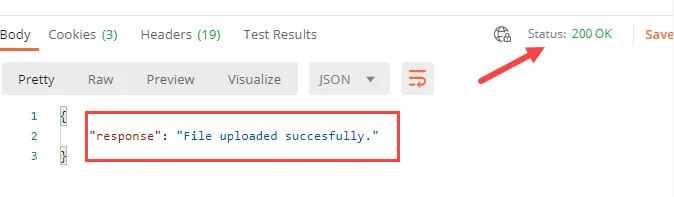
Sample request and response- POST/Loan/{Id}/Attachments
Required parameters
- For multiple types of any single document listed above, add the numerical value to the name. Example: For multiple paystubs (PS): 179317-PS1 and 179317-PS2
- You can submit an additional 99 files as needed for underwriting, by following the convention, F1 - F99.
- If you want to submit an --F3 file, notify CR ahead of time so we can identify F3 as a security video. Example: MyRandomFile-F3.mov
FAQs
Loan stuck in the status Received
A loan stays in Received for these reasons:
- The file wasn't named correctly based on regex verification
- Some or all required documents weren't received
- There was a problem unzipping the files. If a file is corrupt, Arix won't be able to unzip it. Fix it and resend a POST with the attachments.
Confirming document status
To confirm the document status for a loan, call GetLoanDetail and use these collections:
- RequiredDocs - to see which documents are required for a loan and if they were received.
- Attachments- to see which documents were received by Arix
Adding loan documents
You can add documents if a loan is in one of the statuses below. If a document is sent after the loan is funded, Arix will store it, but it won't parse it or run it through compliance.
Status | Description |
|---|---|
1 | Received |
2 | DocsComplete |
3 | PassedCompliance |
4 | Approved |
11 | AwaitingFunding |
101 | ComplianceFailed |