Reboot via the DWS
4 min
If you need to reboot your player but don't have physical access to it, the easiest way to reboot it is via the player's Diagnostic Web Server (DWS).
Remote Access
If the player is connected to the internet and is registered with BSN.Cloud, the DWS can be accessed remotely (i.e., over the internet). See DWS: Remote Access for more details.
Local Access
If the player is accessible over the local network, the DWS can be accessed over the local network, assuming that local access of the player has been enabled. Refer to this important note:
Rebooting
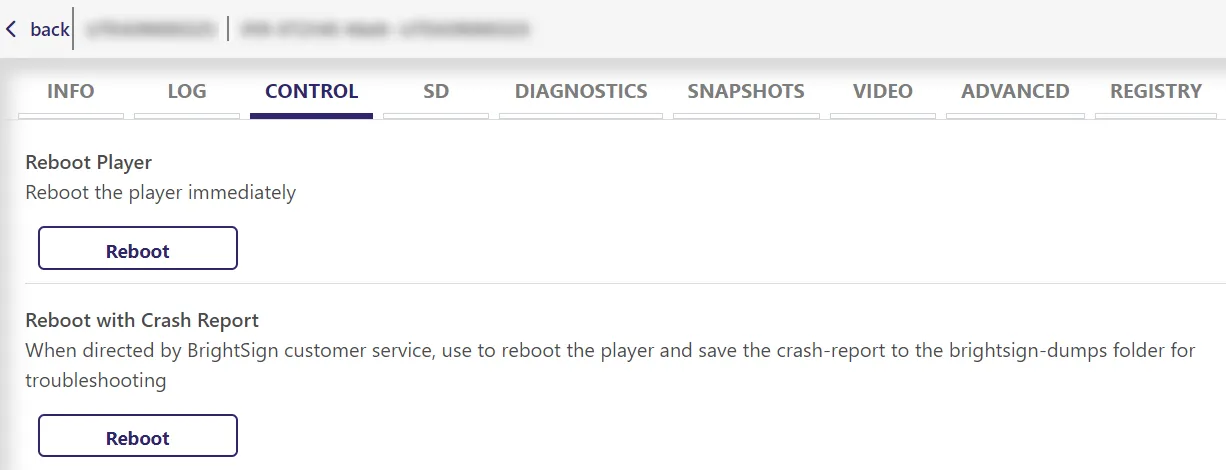
From the DWS, go to the Control tab.
From there, you can simply Reboot Player or Reboot with Crash Report. See descriptions in screenshot above.
Other Methods
- To reboot via the legacy BSN (BrightSign Network), see Reboot a Player via BSNReboot a Player via BSN
- To schedule reboots, see Schedule Player RebootsSchedule Player Reboots
- To reboot via UDP command, see Reboot Locally Networked Players via UDP commandReboot Locally Networked Players via UDP command