Connect Your Modem
3 min
Prerequisites for MDM-NA Modems
- You must be using BrightSign Author version 1.6.31 or later.
- Your player must be running BrightSignOS 8.2.8 or later.
Prerequisites for MDM-EU Modems
- You must be using BrightSign Author version 1.6.31 or later.
- Your player must be running BrightSignOS 8.2.80 or later so the data service connects properly. For instructions on how to update BrightSignOS, see Update the Player OS.
- If your player was previously connected to the modem on a lower version of BrightSignOS, you must:
- Upgrade to the later production version of BrightSignOS (8.2.80+).
- Factory reset the player (see Factory Reset a Player).
- Follow the setup instructions below.
Setup
To set up your player, either boot a player with a setup file on an SD card, or through the activation screen with a blank SD card:
- Factory reset an existing player and update your new player to BrightSignOS 8.2.72 or later.
- Eject the SD card.
- Insert the modem into the player.
- Restart the player and wait for modem light to turn solid (not flashing) blue.
- Insert the SD card with the setup files or the blank SD card. If you are using a blank SD card:
- When the BrightSign activation screen appears, you should see the activation code on the screen.
- Claim the player with the activation code through the Activate interface.
Notes
- You cannot publish to a player that has been set up using LFN (Local File Networking).
- It can take up to 10 minutes to complete player activation using the modem, depending on signal strength in your area.
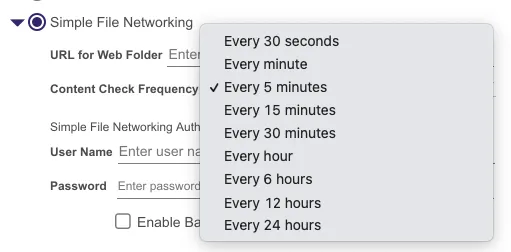
- SFN setup may cause high data usage so we recommend that you set the Content Check Frequency to Every 24 hours (see the image below).