Accessories
What inputs are supported? (IR, Serial, etc..)
See Supported Input Devices.
Can I control playback from an external system?
There is no control protocol for BrightSign players. The active presentation determines the triggers to which the player will listen and respond.
The “How to use Interactive Button Panels” video at the bottom of this page shows the basics of adding interactivity (in this case, triggering actions via GPIO buttons). The same concept applies to UDP messages (UDP Input), RS-232/TTL input (Serial Input), and other interactive events.
Can I use a keyboard/mouse with players?
Yes. You can connect a USB keyboard or mouse to any BrightSign player that has a USB port and use a mouse (or touchscreen) and keyboard to generate interactive events. In a BrightSign Author interactive presentation, you can add a USB Event for mouse input or a Keyboard Event for keyboard input.
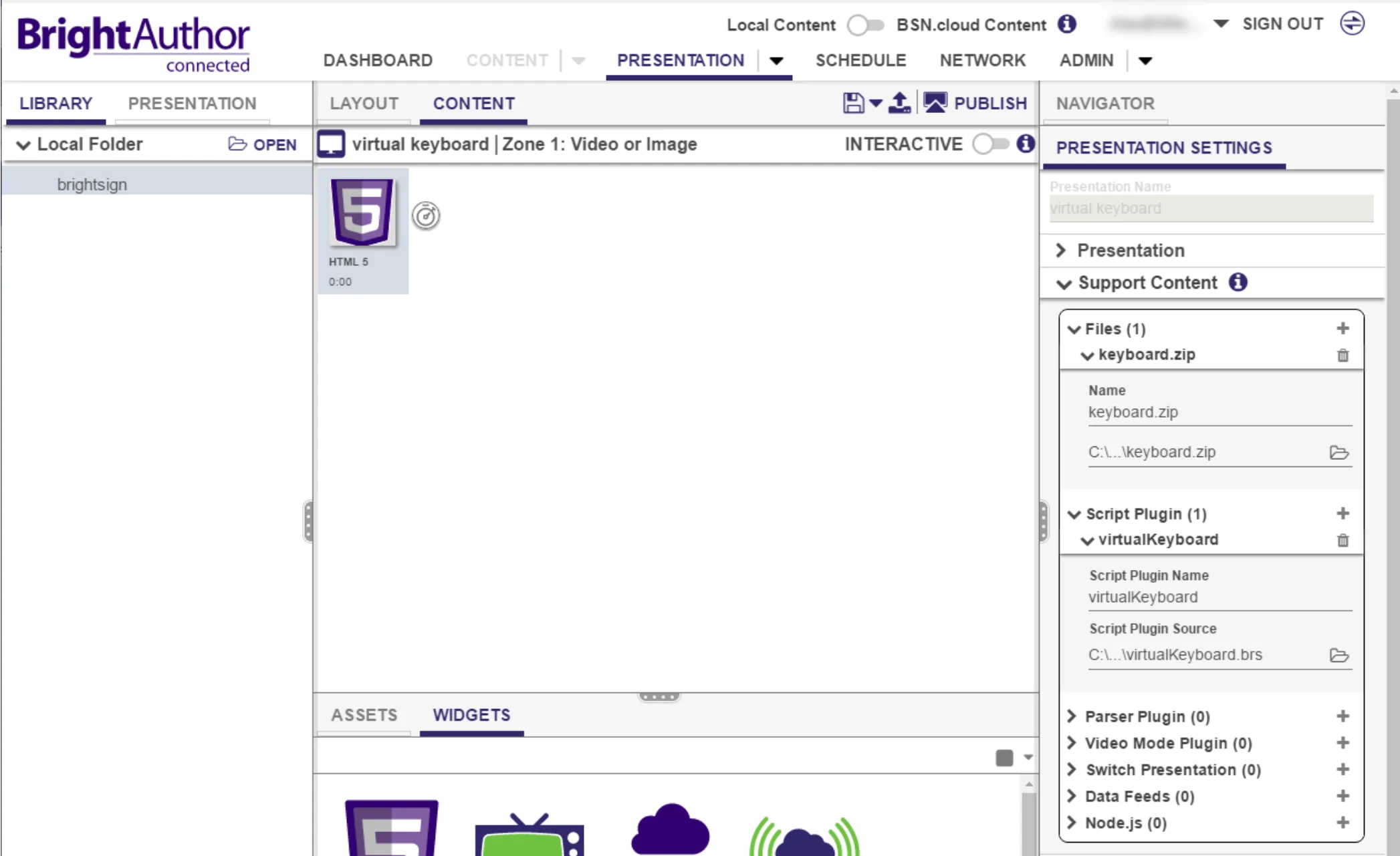
To implement a virtual keyboard, see these GitHub instructions and add the keyboard.zip and virtualKeyboard.brs to your presentation as shown below. After you publish, the keyboard will automatically pop up when you select a text input field.
Mice can be used with interactive playlists and HTML presentations in BrightSign Author. To use a mouse with an interactive playlist, use an interactive touch and then add a mouse/touch icon for the mouse input or a keyboard icon for keyboard input.
To show the cursor in a BrightSign Classic presentation, go to File > Presentation Properties > Interactive and select Always display cursor (this option ensures that the cursor will only appear if there's more than one region in an Interactive Touch event).
To use a mouse with a BrightAuthor Classic HTML presentation, open the HTML5 State and check the Enable Mouse and Touch Events box. You may also want to select Display Cursor.
Can I use barcode scanners/RFID receivers?
Yes. BrightSign players will work with barcode scanners or RFID receivers that use USB. These HID devices use a method similar to a keyboard to send information. The USB Event in BrightSign Author can be used for barcode scans.
Can I output serial with a USB-to-Serial adapter?
Yes, BrightSign players support serial output over USB using an adapter. You can even output multiple serial signals using both the USB port and the 3.5mm/DB9 serial port on the player (for more information, see this FAQ).
USB adapters with Prolific and FTDI chipsets have been tested and proven to work with BrightSign players.
Is WPA3 supported?
BrightSign will implement support for the WPA3 Wi-Fi security protocol in the near future. We currently support WPA and WPA2.
Can I modify Bluetooth module transmitter power levels?
The power level of the Bluetooth module transmitter cannot be reduced via software. However it can be reduced by adding an SMA attenuator to the antenna or by removing the antenna altogether. The following are approximate power levels with these different methods:
- Standard antenna: -50dBm
- Standard antenna w/ -20dB attenuator inline: -70dBm
- No antenna: -95dBm
Follow these steps to attach an SMA attenuator to the standard module antenna:
- Attach a reverse-SMA-to-SMA adapter to the antenna connector.
- Attach the SMA attenuator(s) to the reverse-SMA-to-SMA adapter.
- Attach an SMA antenna to the SMA attenuator, or attach the standard antenna to the SMA attenuator using a reverse-SMA adapter.
Can I disable external storage?
To disable external storage for an XCx55, XTx45/XTx44/XTx43, XDx35/XDx34/XDx33, or 4Kx42 player, write the "internal_only" value to the registry using BrightScript. This page has instructions for disabling and re-enabling external storage.
Why are exFAT and NTFS the only format options for my SDXC card?
Some SDXC cards are formatted using exFAT, while other SDXC cards may be formatted as NTFS, which has limited support. If Windows does not give you the option to format as FAT32, you can download the GUIformat utility to reformat your card as FAT32: https://www.brightsignnetwork.com/download/Tools/guiformat.zip
Rename the guiformat.axe file to guiformat.exe after unzipping the file.