Pav2 to Arix integration: Draws or line-of-credit
Pav2 to Arix integration
The Pav2 to Arix integration gives partners a single API entry point for the full loan lifecycle. Application data submitted through Pav2 is automatically translated and forwarded to Arix for loan creation; eliminating duplicate integrations, reducing onboarding timelines, and getting you to your first funded loan faster.
To operate Line of Credit (LOC) loans or loans with Multiple Draws, or to enable you to buy draws, you need to implement the process of submitting a master application + loan, and then subline "loan" directly to Arix.
Sublines do not require another application submission, unless there is a new decision on the application. The application submission creates the master line in this flow.
Line of credit flow: Step-by-step
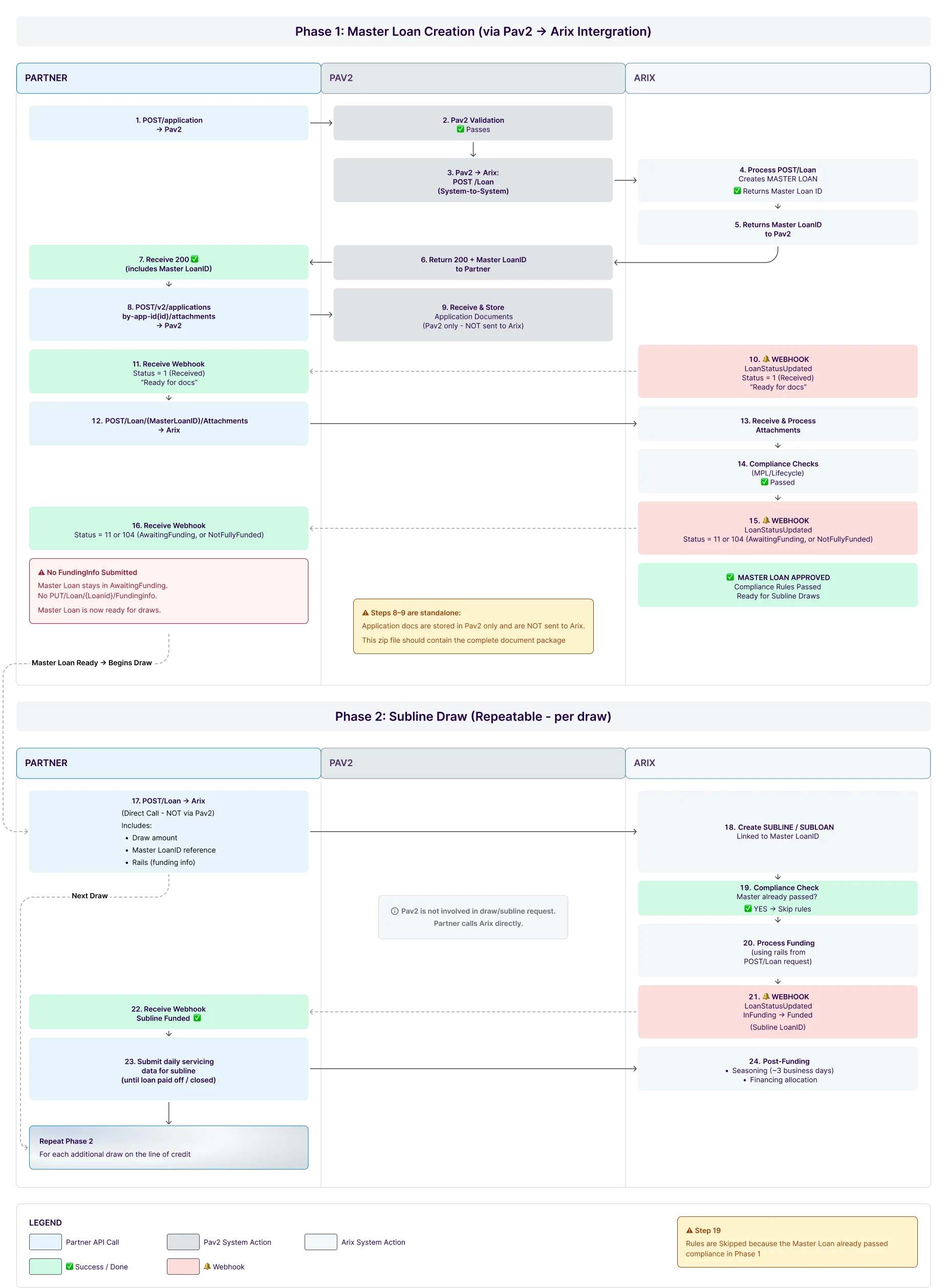
Phase 1: Master loan creation (one-time)
- Partner → Pav2: POST /Applicationapplication (submit LOC application)
- Pav2 validates and calls Arix POST /Loan (system-to-system) when an application is approved and ready for funding according to application details.
- Pav2 → Partner: Returns 200 with Master LoanID. Save this ID for calling Arix.
- Partner → Pav2: POST /v2/applications/by-app-id/{applicationid}/attachments (app docs stored in Pav2 only, not sent to Arix)
- Arix → Partner: Webhook LoanStatusUpdated Status = 1 (Received)
- Partner → Arix: POST /Loan/{MasterLoanId}/Attachments (compliance docs)
- Arix runs compliance checks → ✅ Passes
- Arix → Partner: Webhook LoanStatusUpdated Status = 11 (AwaitingFunding) or 104 (NotFullyFunded)
- ⛔ Master Loan should not include funding. If you need status to be Funded, you can call Loan funding - payment railsPut /FundingIn with an empty array [] of rails.
✅ Master Loan approved and ready for draws
Phase 2: Subline draw (repeat per draw)
- Partner → Arix (direct): POST /Loan includes draw amount, Master LoanID reference, and rails[] (funding info)
- Pav2 is not involved in draws
- Arix creates Subline linked to Master → skips compliance (Master already passed) → processes funding using rails[]
- Arix → Partner: Webhook LoanStatusUpdated InFunding → Funded (Subline LoanID)
- Partner submits daily servicing data for the subline until paid off/closed
🔄 Repeat Steps 17–24 from the step-by-step flow for each additional draw
Details and format of subline draws
Unique loan number
- When calling Pav2 to open the LOC: The field Loannumber = <loan-number>
- On Draws: The field Loannumber = <loanNumber>-yyyymmdd (add mmss if needed to make more than one draw per day).
Oversight
We perform oversight checks when the LOC is opened, and Pav2 calls Arix the first time for the partner. For subsequent draws, the JSON in field5 should contain the following:
{
  "Loan": {
    "LoanNumber": {{loanNumber}}, // in form <loanNumber>-yyyymmdd (add mmss if needed to make more than one draw per day).
    "IssuingBankId": "CRB", // hardcode this
    "Platform": "PartnerPlatform", // hardcode this
    "LoanType": 1, // same as master line
    "NoteDate": "2025-12-18", // same as master line
    "BorrowerLastName": "a LOC draw", //hardcode this
    "BorrowerFirstName": "This is",//, hardcode this
    "BorrowerDOB": "1970-01-01", // hardcode this
    "BorrowerSSN": "999999999", // hardcode this
    "BorrowerAddress": "2115 Linwood Avenue" , // hardcode this
    "BorrowerCity": "Fort Lee", // hardcode this
    "BorrowerState": "NJ", // hardcode this
    "BorrowerZip": "07024", // hardcode this
    "Rate": 10.0, // hardcode this
    "APR": 10.0, // hardcode this
    "Program": "Draw", // hardcode this
    "LoanAmount":5000000.00, // this amount needs to match the amount of the draw
    "NetFunding":5000000.00, // this amount needs to match the amount of the draw
    "Field5": "[{\"RevolvingLineFirstAppearance\":\"no\",\"RevolvingLineBalanceAsOfWhenCallingCRB\":4602199.98,\"RevolvingLineGUID\":\"This is the GUID that you receive on the response from PAV2\",\"CreditPolicyVersion\":\"v1.1\"}]",
	"Rails": [
         {    // this example is using an XPAY rail. you shoud use for your draw the rail that is needed
        "XPayFields": {
                    "ToAccountName": "TETArixStgChecking", // sandbox
                    "ToAccountNumber": "2122225523", // sandbox
                    "Description": "test draw"
                },
                "RailType": "COSXPay",  // this should be the rail that you need to use
                "Priority": 1,
                "Amount": 5000000.00    // this amount needs to match the amount of the draw
         }
    ]
  }
}
The information in field5 of the above JSON, will allow the system to connect to the Master Loan. Here is a closer look:
{
   "RevolvingLineFirstAppearance":"no",
   "RevolvingLineGUID":"GUID from Origination/First Appearance,
   "RevolvingLineBalanceAsOfWhenCallingCRB":"$123",
   "CreditPolicyVersion":"v1.1"
}
Field Rails should contain the payment rails to be funded.
NetFunding rule
Loan Tape:
Loan Agreement:
|
Or 3. For draws, NetFunding = sum of the rails being funded |
|---|
Draw rule
Loan Tape
|
|
|---|